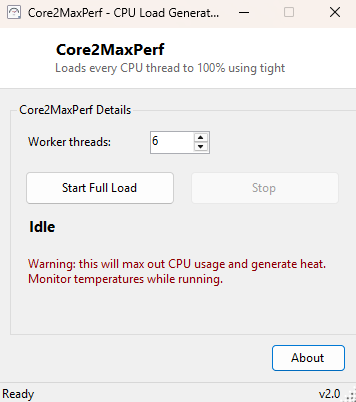
Overview
Core2MaxPerf is not a benchmark in the sense of producing a score you compare against someone else's number — it is a pure, configurable CPU load generator, and that distinction matters. Its entire job is to push a chosen number of logical processors to sustained 100% load and hold them there indefinitely, so you can watch how the rest of your system — temperatures, clock behavior, fan curves, power draw — responds to genuine full load using whatever monitoring tool you prefer running alongside it. Where a scored benchmark tells you "your CPU is this fast," Core2MaxPerf answers a different, equally important question: "can my CPU sustain full load without throttling, crashing or overheating."
Key Features
- Configurable worker thread count, from a single core up to every logical processor
- Sustains 100% load indefinitely until you choose to stop it
- Simple Start/Stop control with no scoring or timed test phase to wait through
- Designed to run alongside other monitoring tools like CPU Temperature Monitor
- Cancellation is immediate and clean — no lingering background threads after Stop
- Clear on-screen warning about heat and power draw before you start
Why You Might Need This Tool
The most common use is validating cooling — after building a new PC, applying new thermal paste, or adding an overclock, the real question is not "how fast is it" but "will it survive being pushed hard for an extended period." Running Core2MaxPerf for fifteen or twenty minutes while watching CPU Temperature Monitor or CPU Throttle Detector in a second window will quickly reveal whether temperatures plateau at a safe level or keep climbing toward a thermal shutdown. It is also useful simply to generate consistent background load while testing how another application or game behaves when competing for CPU time, without needing to actually run something else resource-intensive.
How It Works
When you click Start, Core2MaxPerf spins up one dedicated background task per
requested thread using Task.Factory.StartNew with the
TaskCreationOptions.LongRunning hint, which asks the .NET thread pool to
give each task its own dedicated OS thread rather than sharing a small pool — important
for genuinely saturating every requested core rather than a handful of tasks fighting
over too few pool threads. Each worker thread then runs a tight, allocation-free loop
of floating-point math (Math.Sqrt chained repeatedly) that deliberately
avoids anything that could be optimized away or cause the thread to wait or yield,
keeping that logical processor pegged at 100% for as long as the loop runs. A shared
CancellationToken is checked on every iteration, so clicking Stop causes
every worker thread to exit its loop and terminate within a fraction of a second — there
is no delayed or partial shutdown.
How to Use It
Set the number of worker threads (defaulting to your CPU's full logical processor count) and click Start Full Load. Watch temperatures and clock behavior in another monitoring tool for as long as you want to test, then click Stop to return immediately to idle.
System Requirements & Notes
Core2MaxPerf runs on 64-bit Windows 10/11 and does not require administrator rights. Sustained full-load testing generates real heat and draws meaningfully more power than normal use — do not leave it running unattended on a system you have any doubts about the cooling of, and stop the test immediately if temperatures climb toward your CPU's rated maximum.
Frequently Asked Questions
How is this different from IntelBurnTest on this site?
IntelBurnTest runs a specific Linpack-style matrix workload and reports an estimated
GFLOPS score; Core2MaxPerf is a plainer, unscored load generator meant purely for
sustained thermal and stability observation.
How long should I run it for?
There is no fixed answer — ten to twenty minutes is usually enough to see whether
temperatures plateau safely or keep climbing, but longer runs give more confidence for
a genuinely stable, always-on system like a home server.
Will this test my RAM as well?
No — for memory stability testing specifically, use MemTest64
elsewhere in this catalog.