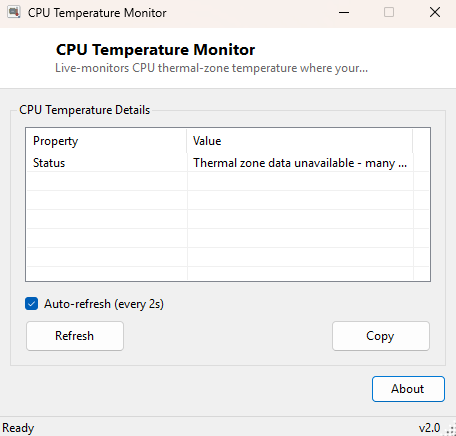
Overview
CPU Temperature Monitor is a live-updating readout of your processor's thermal state, pulling data from the same ACPI thermal zone interface Windows itself uses internally for thermal management. It auto-refreshes on a short interval so you can watch temperature respond in real time as load changes — during a stress test, during a render, or simply while you work — without needing a heavier full system monitoring suite running in the background.
It is worth setting expectations honestly from the start: ACPI thermal zone data is a board-level reading, not always a precise per-core digital thermal sensor value the way a dedicated tool reading directly from Intel's or AMD's proprietary MSRs (model-specific registers) can provide, and a meaningful number of OEM motherboards simply do not populate this WMI class at all. This tool reads exactly what is available and says so plainly when it is not.
Key Features
- Live auto-refreshing temperature readout with a toggleable interval
- Reads directly from the ACPI thermal zone WMI interface, no third-party driver required
- Converts the raw tenths-of-Kelvin value Windows reports into familiar Celsius
- Clear on-screen explanation when a board does not expose thermal zone data
- Manual Refresh and Copy-to-clipboard controls alongside the auto-refresh option
Why You Might Need This Tool
The most common use is a quick sanity check while running something demanding — a game, a video export, a compile job — to confirm the system is staying within a reasonable thermal range rather than silently cooking itself under a failed or poorly-seated cooler. It is also useful immediately after reseating a CPU cooler or replacing thermal paste, where watching idle and light-load temperatures for a few minutes gives fast feedback on whether the reseat actually improved contact. For laptop owners specifically, this tool is a lightweight way to confirm whether unusual fan noise correlates with a genuine temperature spike or is happening for an unrelated reason.
How It Works
The tool queries MSAcpi_ThermalZoneTemperature in the
root\WMI namespace, reading the CurrentTemperature field
for every reported ACPI thermal zone on the system. This value arrives from Windows
in tenths of a degree Kelvin, so the tool converts it with the formula
(value / 10.0) - 273.15 to produce a familiar Celsius reading. Because
ACPI thermal zones are a board-and-firmware-level feature rather than a guaranteed
universal interface, a meaningful number of motherboards — particularly on laptops and
some budget desktop boards — simply do not populate this WMI class at all, either by
manufacturer choice or firmware limitation. When no thermal zones are returned, the
tool reports "No ACPI thermal zones reported by this system" rather than silently
showing nothing, and if the underlying WMI query itself throws an exception, it
reports that the thermal zone class is unavailable rather than crashing.
How to Use It
Launch the tool and, if your board exposes thermal zone data, you will see one or more zone readings update automatically at the configured interval. Leave the auto-refresh checkbox enabled while running a stress test or game to watch temperature respond live; disable it if you only want a single manual snapshot. If the window reports no thermal zone data available, that reflects a genuine limitation of your specific motherboard's firmware, not a bug — a vendor-specific tool tied to your particular chipset (such as HWMonitor or your motherboard manufacturer's own utility) may still be able to read temperature through a different, proprietary interface.
System Requirements & Notes
Runs on 64-bit Windows 10 and Windows 11, no administrator rights required for reading the ACPI thermal zone WMI class.
Frequently Asked Questions
My system shows "No ACPI thermal zones reported" — is my CPU actually
overheating?
Not necessarily — this message means your specific motherboard firmware does not
populate this particular WMI interface, which is common on many boards regardless of
actual thermal health. It says nothing about your CPU's real temperature.
Why don't the numbers match my motherboard's own monitoring app?
Different tools often read from different sensor sources — ACPI thermal zones versus
per-core digital thermal sensors via vendor-specific driver access — and small
discrepancies between them are normal and expected.