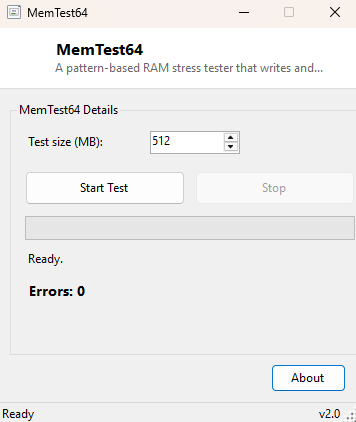
Overview
Faulty RAM produces some of the most maddening symptoms in all of PC troubleshooting — random application crashes, corrupted files that were fine yesterday, blue screens with a different error code every time, instability that only shows up under load. Traditional memory testing means rebooting into a bootable USB image and running MemTest86 outside Windows entirely, which is thorough but inconvenient when you just want a quick sanity check without interrupting your session. MemTest64 fills that gap: it runs directly inside Windows, allocates a block of RAM you choose, writes a rotating set of bit patterns across every element, reads them back, and flags any mismatch as a genuine hardware fault rather than a benchmark score.
Key Features
- Configurable test size, from 64 MB up to 16 GB per run
- Rotates through four classic stress patterns: all-ones, all-zeros, alternating 0xAA and 0x55
- Runs continuously in a background thread until you stop it, so you can leave it testing overnight
- Live progress bar and running error counter updated during each pass
- No reboot or bootable USB drive required — runs entirely inside your current Windows session
- Reports every mismatch individually, so a single flaky bit is never silently averaged away
Why You Might Need This Tool
The clearest trigger is unexplained instability — crashes with no obvious pattern, a system that only misbehaves after running for a while under heavy load, or errors that started appearing after installing new memory. MemTest64 will not catch everything a dedicated bootable memory tester like MemTest86 can (running inside Windows means the operating system and every other process are also using memory concurrently, which limits how much of physical RAM can be tested and reduces isolation), but it is an excellent fast first check that requires no downtime, no reboot, and no USB drive — you can start a test, keep working, and come back later to see whether any errors turned up. Builders and upgraders also run it briefly right after installing new memory modules, as a quick confidence check before trusting the new RAM with real work.
How It Works
MemTest64 allocates a managed UInteger array sized to the number of
megabytes you selected (four bytes per element), then runs an infinite loop on a
background thread until cancelled via a CancellationToken. Each pass
selects the next pattern from a fixed rotation — &HFFFFFFFF (all
bits set), &H0 (all bits clear), &HAAAAAAAA and
&H55555555 (alternating bit patterns chosen specifically because
they are effective at catching bits that are stuck or that interfere with their
electrical neighbors) — and writes that value into every element of the array in
sequence. Immediately afterward, the same array is read back element by element and
compared against the expected pattern; any element that does not match increments
the error counter and is reported. Progress updates are marshalled back to the UI
thread periodically during both the write and verify phases so the interface stays
responsive throughout a long-running test. Because the array lives in ordinary
managed memory rather than a specially reserved, isolated region, results should be
read as a strong signal rather than an absolute guarantee — any error found is worth
taking seriously, but a completely clean run inside Windows is not quite as
conclusive as a clean multi-hour pass from a dedicated bootable tester.
How to Use It
Set the test size in megabytes — a size comfortably below your total installed RAM, leaving enough headroom for Windows and other running applications, is both safer and more effective than trying to allocate every last available megabyte. Click Start Test and let it run; the error counter should read zero throughout a healthy pass. Click Stop whenever you are satisfied, or leave it running for an extended soak test if you suspect an intermittent fault that only appears after sustained stress.
System Requirements & Notes
Runs on 64-bit Windows 10/11 and requires no administrator rights, since it only allocates ordinary process memory. Choosing a very large test size on a system with limited free RAM can cause Windows to page heavily or the allocation itself to fail — if that happens, reduce the requested size.
Frequently Asked Questions
Does this replace MemTest86?
Not entirely — a bootable, OS-independent test like MemTest86 can access and
isolate more of physical RAM and runs with no other software competing for memory
at the same time. MemTest64 is the fast, no-reboot-required first check; a clean
MemTest86 pass remains the more rigorous confirmation for genuinely suspect hardware.
Any error at all means bad RAM?
Yes — a correctly functioning memory module should never return anything other than
exactly what was written to it. Even a single reported mismatch is worth
investigating further, ideally with a dedicated bootable tester to confirm and
isolate which module is at fault.
Will this test survive if Windows crashes during the test?
No — if the fault is severe enough to crash Windows itself, the test simply ends
with the crash rather than reporting a result, which is itself a strong signal that
something is seriously wrong.