Overview
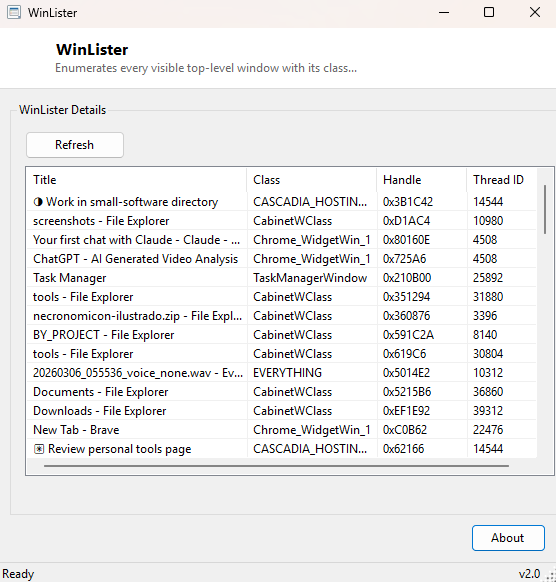
WinLister enumerates every visible top-level window on your desktop and shows what Windows itself actually knows about each one — its window class name, its numeric handle, and the thread ID of the process that owns it — independent of whatever text happens to be sitting in that window's title bar. This is a foundational diagnostic view for anyone working with UI automation, window-management scripting, or simply trying to understand why a particular window is behaving unusually, because a window's class name and handle are the stable, reliable identifiers Windows itself uses internally, while a title bar's text can be blank, generic, or actively misleading.
Key Features
- Lists every visible top-level window currently on the desktop
- Shows each window's title, class name, handle value and owning thread ID together
- Refreshes on demand with a single button, capturing the current window state
- Reveals windows with generic or duplicate titles as distinct entries via their unique handles
- Purely a diagnostic viewer — cannot close, move or otherwise manipulate any listed window
Why You Might Need This Tool
UI automation developers and script writers constantly need to identify a target window reliably before they can send it a message, resize it, or bring it to the foreground — and a window's class name is almost always the correct, stable identifier to key off, since two different windows can easily share an identical or blank title. WinLister gives you that class name at a glance without needing a separate spy-tool installation. It is equally useful when troubleshooting a misbehaving application — confirming a hidden or off-screen window genuinely exists (and what its handle is) is often the first step before deciding how to bring it back into view.
How It Works
The tool calls the Windows EnumWindows API, which invokes a callback once
for every top-level window currently known to the system. For each window the callback
receives, it checks visibility with IsWindowVisible, then retrieves the
window's title text with GetWindowText, its class name with
GetClassName, and its owning thread ID (and, through the same call, its
owning process ID) with GetWindowThreadProcessId. Only windows that pass
the visibility check and have non-empty title text are added to the results list,
filtering out the large number of invisible utility and helper windows every running
application typically creates in the background.
How to Use It
Launch the tool and click Refresh to capture the current window list — do this again at any point to see an updated snapshot after opening, closing, or interacting with other windows, since the list reflects a single point-in-time scan rather than updating live.
System Requirements & Notes
Runs on 64-bit Windows 10 and Windows 11 with no administrator rights required — enumerating visible windows and reading their basic properties is a standard-user operation. It cannot see windows owned by processes running at a higher integrity level than the tool itself, which is a normal Windows security boundary.
Frequently Asked Questions
Can I use this tool to close or minimize a listed window?
No — WinLister is read-only by design. For closing a stubborn window, see
Unlocker or Always On Top
for related but distinct window-management actions.
Why do I see windows I don't recognize by title?
Many applications create small utility windows with generic or blank titles for
internal purposes — the class name column is usually the more reliable way to identify
what an unfamiliar entry actually is.