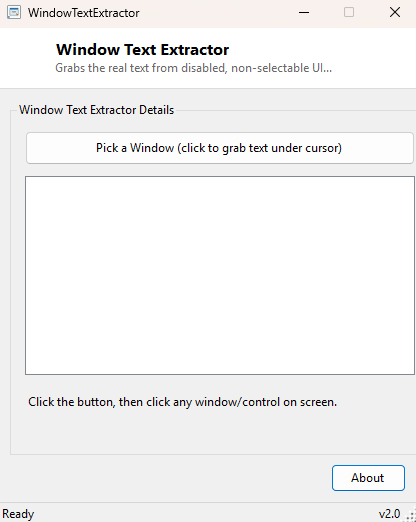
Overview
Every so often you run into a Windows application that shows you a piece of information — an error code, a greyed-out label, a value in a disabled text box — that you genuinely cannot select or copy through normal means. The control is disabled or intentionally non-interactive, but the text is still sitting there in the window's underlying data, simply not exposed for the user to grab. Window Text Extractor reaches directly into that underlying window and pulls the text out regardless of whether the control's own UI would ever let you select and copy it yourself.
Key Features
- Point-and-click capture — click any visible control in any open window to grab its text
- Works on disabled and non-selectable controls, not just normal editable ones
- Shows the underlying window class name alongside the extracted text for context
- Keeps a running list of everything captured during the session
- Works across process boundaries — the target does not need to be a Debmedia tool or any special "extractable" application
Why You Might Need This Tool
The classic scenario is an error dialog from some piece of software whose message is too long to read comfortably, sits in a disabled label, and offers no "copy to clipboard" button — exactly the moment you want to paste that exact error text into a search engine or a support email but the application will not let you select it. It is equally useful for pulling a value out of a locked or read-only field in an older Win32 application built without modern accessibility support, or simply confirming what window class a mysterious control actually is while debugging UI automation scripts.
How It Works
Clicking Pick a Window starts a short polling loop that watches
Control.MouseButtons on a 100-millisecond timer rather than requiring a
global mouse hook. The moment it detects a left-button click anywhere on screen, it
calls the Windows WindowFromPoint API with the current cursor position
to get the handle of whatever control is physically under the cursor at that exact
pixel — not just the top-level window, but the specific child control, button or
label. It then reads that control's class name with GetClassName for
context, and attempts to read its text two different ways: first via the standard
GetWindowText API, and if that returns nothing (which happens for many
disabled or custom-drawn controls that do not populate the standard window title
text), it falls back to sending a WM_GETTEXT message directly to the
control via SendMessage, which many controls still respond to correctly
even when their standard title text is empty or when they are visually disabled.
How to Use It
Click Pick a Window, then move your mouse over the control whose text you want and left-click it — anywhere on screen, in any open window. The extracted class name and text appear at the top of the results list immediately. Repeat as many times as needed; each capture adds a new entry rather than replacing the last one.
System Requirements & Notes
Requires no administrator privileges for most applications. A small number of controls belonging to processes running with higher privileges than your own user session (for example, some elevated administrative dialogs) may not respond to the text-reading calls due to Windows' User Interface Privilege Isolation (UIPI), which blocks lower-privilege processes from reading into higher-privilege windows by design.
Frequently Asked Questions
Does this work on web pages open in a browser?
Only partially — modern browsers render page content inside a single custom control
rather than exposing each element as a separate Win32 window, so this technique
generally only captures browser chrome (address bar, tab titles) rather than
in-page text.
Can I use this to read another user's password field?
No — it only ever reads whatever control is under your own mouse cursor within your
own active desktop session, the same access any user already has to what is visibly
on their own screen.
Why did it capture "(no text)" for a control I clicked?
Some custom-drawn controls store their visible text entirely outside the standard
Win32 text APIs this tool uses, particularly in applications built with modern UI
frameworks like WPF or certain custom-rendered controls.