Overview
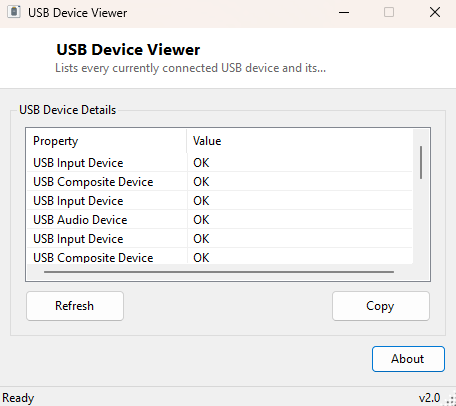
USB Device Viewer lists every USB device Windows currently recognizes as connected, along with each device's reported status, in one plain window. Device Manager can show the same information, but only after navigating a tree of categories that scatters USB devices across "Universal Serial Bus controllers," "Human Interface Devices," "Imaging devices" and several other unrelated-sounding nodes depending on what each device identifies itself as. This tool instead filters directly on the device ID prefix Windows assigns to anything actually connected over USB, so everything shows up together regardless of which driver category it happens to fall under.
It is a snapshot tool rather than a live monitor — click Refresh after plugging or unplugging something rather than expecting the list to update automatically, which keeps the tool simple and avoids any background polling overhead.
Key Features
- Lists every currently connected USB device by its Windows-reported friendly name
- Shows each device's current status (OK, Error, Unknown, etc.) reported by the driver stack
- Groups purely by USB connection, cutting across Device Manager's category tree
- One-click Refresh to re-scan after plugging or unplugging hardware
- Copy button to export the full list as tab-separated text
Why You Might Need This Tool
The most common reason to reach for this tool is troubleshooting: a USB device stops working and you need to quickly confirm whether Windows sees it at all, and if so, whether it reports a healthy status or an error. It is also useful for a fast inventory check — confirming exactly what is plugged into a machine before handing it off, auditing a shared or public-facing PC for unexpected USB devices, or simply double-checking that a newly installed webcam, headset or card reader actually enumerated correctly before digging further into driver-specific troubleshooting.
How It Works
The tool queries Windows Management Instrumentation directly, running the WQL query
SELECT Name, Status FROM Win32_PnPEntity WHERE DeviceID LIKE 'USB%'.
Every Plug and Play device Windows manages — USB or otherwise — is represented as a
Win32_PnPEntity instance with a hierarchical DeviceID string that begins
with a prefix identifying its bus type; filtering that prefix down to entries starting
with USB isolates exactly the devices connected over a USB bus, whether
they are a mouse, a flash drive, a printer, a Bluetooth dongle, or a USB hub itself.
The Name property returns whatever friendly name the device's driver
registered, and Status reflects Windows' own health assessment of that
device instance at query time.
How to Use It
Launch the tool and it populates immediately on open. After connecting or disconnecting a USB device, click Refresh to re-run the query and update the list — Windows Management Instrumentation queries are point-in-time snapshots, not live subscriptions, so the list will not update on its own. Use Copy to place the full property/value list on the clipboard if you need to paste it into a support ticket or a note.
System Requirements & Notes
Runs on 64-bit Windows 10 and Windows 11 and requires no administrator rights — WMI device enumeration is available to any standard user account.
Frequently Asked Questions
Why does my USB hub itself show up as a separate entry?
Hubs are USB devices in their own right and get their own DeviceID and PnP entry,
exactly like the peripherals plugged into them, so they are listed alongside
everything else.
A device I unplugged is still showing up — why?
The list only reflects what it saw on the last query; click Refresh after any change
to hardware to get a current snapshot.
Does this show USB Vendor/Product IDs too?
Not on this page — for that level of detail see
USB Vendor ID Viewer and
USB Product ID Viewer, which extract those
specific identifiers from the same underlying device ID string.