Overview
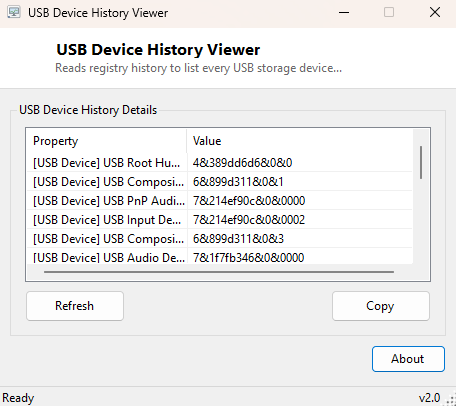
Windows never truly forgets a USB device once it has been plugged in. Long after you unplug a flash drive, an external hard disk, or an old phone, Windows keeps a registry record of it — its friendly name, its device description, and the driver it was matched with — so that reconnecting the same device later is instant rather than requiring a fresh driver install. USB Device History Viewer reads exactly that registry history and presents it as a simple list, showing every USB storage and general USB device this specific PC has ever recognized, whether or not it is currently connected.
This history is invisible anywhere in the standard Windows UI — Device Manager only shows currently connected devices unless you explicitly toggle "show hidden devices," and even then the presentation is awkward for a quick historical review. This tool exists purely to make that hidden history visible and browsable in one pass.
Key Features
- Lists every USB mass-storage device ever connected to this Windows installation, present or not
- Also covers general (non-storage) USB devices recorded in the broader USB enumeration branch
- Shows each device's friendly name or description alongside its registry instance ID
- Groups results by category (Mass Storage vs. general USB Device) for easier scanning
- Purely read-only — never modifies or removes any registry entry
- No live device polling required — reads directly from registry history in a single pass
Why You Might Need This Tool
Data-handling audits are the most common serious use case: verifying, for compliance or incident-response purposes, exactly which removable storage devices have ever touched a given machine. IT support staff use it to confirm whether a specific flash drive a user mentions was ever actually plugged into this PC, or to identify an unfamiliar device that appears in the list and figure out where it came from. On a more everyday level, it is genuinely useful for simply remembering which old external drive, camera, or phone was last connected to a machine you have not used in a while, without having to physically dig through a drawer of cables to test each one.
How It Works
The tool reads two registry branches under
HKEY_LOCAL_MACHINE\SYSTEM\CurrentControlSet\Enum: the
USBSTOR key, which Windows populates specifically for USB mass-storage
devices (flash drives, external hard disks, card readers), and the broader
USB key, which covers every USB device Windows has ever enumerated
regardless of device class. For each device-type subkey found, it walks the nested
instance-ID subkeys underneath and reads the FriendlyName value where
present, falling back to DeviceDesc when it is not — the same two
values Device Manager itself reads to build the names it displays, parsed here
directly rather than through the Device Manager UI. Because Windows creates these
registry entries the first time a device is recognized and never automatically
deletes them when the device is unplugged, the resulting list is effectively a
permanent connection history rather than a live snapshot.
How to Use It
Launch the tool and it immediately reads and displays the full history — there is no scan delay since this is a direct registry read rather than a live hardware enumeration. Scroll through the list, grouped by category, to review every USB mass-storage and general USB device this machine has ever recognized. There is no filtering needed for "currently connected only," since that distinction is exactly the point of this particular tool; for a live view of what is plugged in right now, see USB Device Viewer instead.
System Requirements & Notes
USB Device History Viewer runs on 64-bit Windows 10 and Windows 11. Reading these particular registry branches typically does not require administrator privileges on a standard installation, though some locked-down or managed corporate systems may restrict read access to parts of the registry Enum tree — in that case the tool will simply show fewer entries than expected rather than failing outright.
Frequently Asked Questions
Does this show when each device was last connected?
Not directly — the registry entries themselves do not reliably store a
last-connected timestamp in a simple, universally-present field, so this version
focuses on presence and identity rather than exact connection dates.
Can I delete an entry from history using this tool?
No — this is intentionally a read-only viewer. Removing device history entries
involves editing sensitive parts of the registry Enum tree, which carries real risk
of destabilizing device recognition if done incorrectly, so that capability is
deliberately left out.
Why do some devices show a generic description instead of a proper name?
Not every USB device populates a FriendlyName value — cheaper or
generic devices sometimes only provide the more technical DeviceDesc
string, which the tool falls back to automatically.