Overview
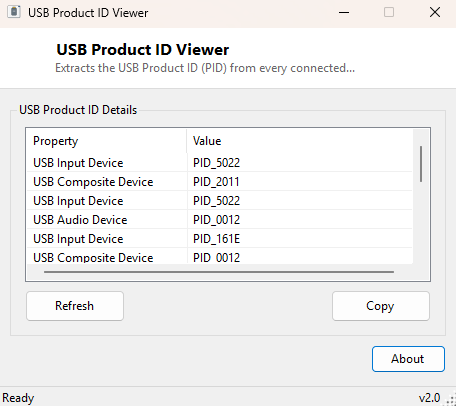
Alongside the manufacturer-level Vendor ID, every USB device also reports a Product ID (PID) — a second four-character hexadecimal code the manufacturer assigns internally to identify the specific product model. USB Product ID Viewer extracts that code for every connected USB device, completing the VID/PID pair that uniquely identifies exactly which product, not just which manufacturer, a device actually is.
Key Features
- Extracts the Product ID (PID) from every connected USB device
- Shows the device's friendly name alongside its PID for context
- Pairs naturally with USB Vendor ID Viewer for a complete VID/PID identifier
Why You Might Need This Tool
A manufacturer's Vendor ID alone only narrows a device down to "made by this company" — the Product ID is what pins down exactly which specific model or revision you are holding, which matters enormously when a single manufacturer sells dozens of superficially similar USB devices across different generations, each potentially needing a different driver. This is the exact pair of numbers a driver installer's INF file matches against internally, and the same pair a hardware database search needs to return a precise result instead of a generic "made by Company X" answer.
How It Works
The tool queries Win32_PnPEntity through WMI, filtering for USB-prefixed
device IDs the same way USB Vendor ID Viewer does, but parses the Plug and Play ID
string for the PID_ marker instead, extracting the four hexadecimal
characters immediately following it. Together with the Vendor ID, this reproduces
exactly the identifier pair Windows uses internally to match a connected device
against installed driver packages during Plug and Play enumeration.
How to Use It
Open the program and every connected USB device's name and Product ID appear immediately. Run alongside USB Vendor ID Viewer to build the complete VID/PID pair for any device you need to identify precisely.
System Requirements & Notes
Runs on 64-bit Windows 10/11 with no administrator rights required.
Frequently Asked Questions
Can the same Product ID appear under different Vendor IDs?
Yes — Product IDs are only meaningful in combination with their Vendor ID, since
each manufacturer assigns its own Product IDs independently within its own numbering
scheme.
Why would I need this instead of just the device's friendly name?
Friendly names are often generic ("USB Mass Storage Device") and tell you nothing
about the exact model, while the VID/PID pair is precise and is what driver
databases and manufacturer support sites actually search against.
Does unplugging and replugging a device change its Product ID?
No — VID and PID are fixed identifiers built into the device itself; only the
Windows-assigned instance path changes between reconnections, not the product
identity.