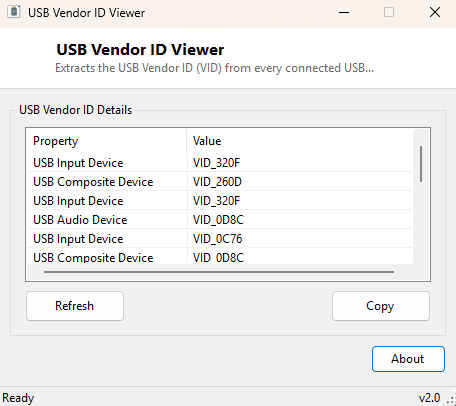
Overview
Every USB device identifies itself to the host system with a Vendor ID (VID) — a four-character hexadecimal code the USB Implementers Forum assigns to each hardware manufacturer — embedded directly in its device descriptor. USB Vendor ID Viewer extracts and lists that code for every currently connected USB device, giving you the exact identifier driver websites, hardware databases and troubleshooting guides actually ask for, rather than a generic product name that may not match what a driver installer expects.
Key Features
- Extracts the Vendor ID (VID) from every connected USB device
- Shows the device's friendly name alongside its VID for context
- Covers hubs, storage devices, input peripherals and every other USB device class
Why You Might Need This Tool
Vendor IDs are the backbone of driver identification — when Windows cannot find a driver automatically and a manufacturer's site asks for your device's exact VID/PID pair, or when an online hardware database is the only way to identify an unbranded or generic device with no visible markings, the four-character VID is the starting point for the whole lookup. This is especially useful for unmarked USB-to-serial adapters, generic sensor boards, and other devices where the physical casing gives no manufacturer clue at all.
How It Works
The tool queries Win32_PnPEntity through WMI, filtering for device IDs
that begin with the "USB" prefix Windows assigns to devices enumerated over the USB
bus. Each matching device's Plug and Play ID string is parsed to locate the
VID_ marker and extract the four hexadecimal characters immediately
following it — the exact same Vendor ID format used throughout Windows' own Device
Manager hardware IDs and every USB-IF vendor lookup database.
How to Use It
Open the program and every connected USB device's name and Vendor ID appear immediately. Plug in a new device and hit Refresh to add it to the list.
System Requirements & Notes
Runs on 64-bit Windows 10/11 with no administrator rights required — reading Plug and Play device identifiers through WMI is a standard-user operation.
Frequently Asked Questions
Where can I look up what a Vendor ID actually belongs to?
The USB Implementers Forum maintains the official vendor ID registry, and several
community-run hardware databases mirror it in a more searchable form; searching the
exact four-character code is usually enough to identify the manufacturer.
Is Vendor ID the same as a driver's hardware ID?
It is one component of it — Windows' full hardware ID for a USB device combines both
the Vendor ID and Product ID together, which is why this tool pairs naturally with
USB Product ID Viewer.
Can two different manufacturers share the same Vendor ID?
No — Vendor IDs are centrally assigned and unique per manufacturer by the USB-IF,
though a single large manufacturer may use one Vendor ID across many different
product lines.