Overview
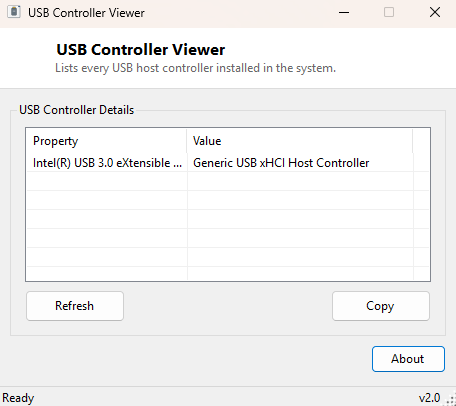
Every USB port on a motherboard is ultimately backed by a USB host controller — the chip (or chipset function) that actually manages the low-level protocol between Windows and whatever gets plugged in. Most people never think about this layer at all, because it usually works invisibly, but it becomes suddenly relevant the moment you are troubleshooting a system with more USB ports than controllers can comfortably share, diagnosing why one specific port behaves differently from its neighbor, or simply trying to understand what hardware is actually managing the USB subsystem on an unfamiliar machine. USB Controller Viewer answers that one specific question — what USB host controllers does Windows currently see — in a single clean list, with no digging through Device Manager's nested tree view required.
This is a deliberately narrow tool. It does not show individual connected devices, it does not show port topology, and it does not attempt to map which physical port belongs to which controller — Windows itself does not expose that mapping cleanly in most cases. What it does is give you the controller-level inventory quickly and reliably, which is often exactly the first piece of information you need before digging deeper with more specialized tools.
Key Features
- Lists every USB host controller Windows currently recognizes
- Shows each controller's manufacturer alongside its full device name
- One-click Refresh to re-scan after plugging in a new USB expansion card
- Copy button exports the entire list as plain text for a support ticket or notes
- Instant startup — the scan runs automatically the moment the window opens
- Read-only: nothing about your USB configuration is changed by running this tool
Why You Might Need This Tool
A common real-world scenario is bandwidth contention: several USB 3.0 devices plugged into ports that, it turns out, all share the same underlying controller can end up competing for the same total throughput, which shows up as unexplained slowdowns on an external drive or a webcam that intermittently drops frames. Knowing how many distinct controllers a system actually has — versus how many physical ports it has — is the first step in understanding whether that kind of contention is even possible on a given machine. It is also useful after adding a PCIe USB expansion card, to confirm Windows actually recognized the new controller chip rather than silently failing to install a driver for it. System builders and IT technicians comparing two supposedly identical machines also reach for a tool like this to confirm the USB hardware genuinely matches, rather than trusting a spec sheet that may not reflect what shipped.
How It Works
USB Controller Viewer queries Windows Management Instrumentation directly,
running a targeted SELECT Name, Manufacturer, DeviceID FROM
Win32_USBController query against the WMI repository. This is the same
class Device Manager itself ultimately reads from when it populates the
"Universal Serial Bus controllers" node, so the results you see here match what
Windows considers authoritative — there is no separate driver polling or
hardware register access involved, just a clean read of data Windows has already
enumerated during boot and device detection. Each returned controller instance is
added to the results list showing its friendly name and manufacturer string side
by side, and the Refresh button simply re-runs the same query, which is useful
immediately after hot-plugging a USB expansion card without needing to restart the
application.
How to Use It
Open the program and the controller list populates immediately — there is nothing to configure. If you have just installed new USB hardware (an expansion card, a dock with its own controller chip, or similar) and want to confirm Windows picked it up, click Refresh after the installation completes. Use Copy to grab the full list as text, handy for pasting into a support request or a system inventory document.
System Requirements & Notes
Runs on 64-bit Windows 10 and Windows 11 without requiring administrator rights —
reading Win32_USBController through WMI is a standard-user operation.
No files, registry keys or settings are modified by this tool under any
circumstances.
Frequently Asked Questions
Why does the count not match my number of USB ports?
That's expected — a single controller chip commonly drives several physical ports
through an internal or external hub, so the controller count is almost always
lower than the total port count on the case.
Does this show connected devices too?
No, this tool is scoped strictly to controllers. For a list of connected devices,
see USB Device Viewer instead.