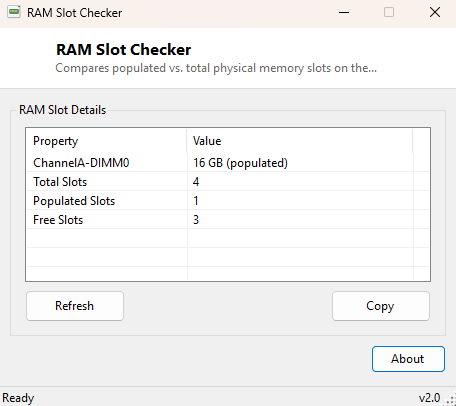
Overview
RAM Slot Checker answers the question you need answered before buying a memory upgrade: how many DIMM slots does this motherboard actually have, and how many of them are currently empty? Product listings and even some manufacturer spec sheets are not always reliable here, especially on laptops and small-form-factor prebuilt PCs where slot count is not printed anywhere visible. This tool reads the real answer directly from the hardware's own reporting rather than relying on a model number lookup that may be wrong or outdated.
Key Features
- Reports total physical memory slots present on the motherboard
- Reports how many of those slots currently have a module installed
- Calculates free slots automatically
- Lists each populated slot's location and installed capacity
- Instant results with no configuration required
- Completely read-only — no risk to installed memory
Why You Might Need This Tool
Before ordering a memory upgrade, knowing whether you are adding to two free slots or replacing an already-full set changes both the cost and the shopping list entirely. It is also useful when buying a used or refurbished PC and wanting to confirm the seller's stated configuration matches reality, or when planning a dual-channel upgrade and needing to know exactly which slots are currently occupied before deciding where new modules should go.
How It Works
The tool queries two related WMI classes. Win32_PhysicalMemoryArray
exposes a MemoryDevices property, which reports the total number of
memory device sockets the motherboard physically has, regardless of how many are
populated. Separately, Win32_PhysicalMemory returns one record per
module that is actually installed, each with its DeviceLocator
(the slot name, such as "DIMM_A1") and Capacity. Subtracting the
count of populated records from the total reported socket count gives the number
of free slots — a calculation Windows itself does not surface anywhere in its own
UI.
How to Use It
Run the tool and read the summary at the bottom of the list: total slots, populated slots and free slots. Each populated slot is also listed individually above the summary with its capacity, so you can see exactly which physical positions are already in use.
System Requirements & Notes
Runs on Windows 10 and 11 x64 without administrator rights. Accuracy depends on the motherboard firmware correctly reporting its physical memory array — the overwhelming majority of desktop and laptop boards do this reliably, though a small number of budget or unusual OEM boards under-report the true socket count.
Frequently Asked Questions
Will this tell me what type of RAM to buy?
Not directly — pair it with RAM Type Detector
to confirm DDR generation and RAM Part
Number Viewer to see exact currently-installed part numbers for a matching
upgrade.
My laptop shows only one slot even though it has 16GB installed — is
that normal?
Yes, many laptops solder part of their memory directly to the motherboard and
expose only a single upgradeable slot, or none at all; this tool reports what the
firmware exposes, which reflects the upgradeable slots only.