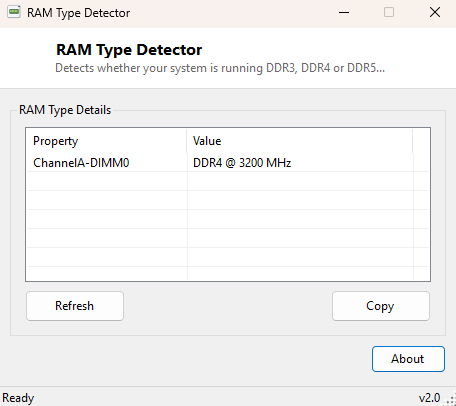
Overview
DDR3, DDR4 and DDR5 memory are not interchangeable in any sense — they use different voltages, different pin counts, and physically different notch positions specifically so that plugging the wrong generation into a board is impossible rather than merely inadvisable. Knowing exactly which generation your system uses matters the moment you plan an upgrade, buy a replacement stick after a failure, or simply want to confirm a listing you are about to buy actually matches your motherboard before it arrives. RAM Type Detector reads the standardized SMBIOS memory type code Windows exposes for every installed module and translates that numeric code into the plain generation name you actually need to know, without requiring you to memorize an SMBIOS specification table yourself.
Key Features
- Identifies DDR3, DDR4, DDR5 and several older or legacy memory types
- Reports per-slot detail, so mixed configurations are visible rather than averaged
- Shows each module's rated speed alongside its detected generation
- Falls back to showing the raw SMBIOS code if a type is genuinely unrecognized
- Reads directly from firmware-reported SMBIOS data for accuracy
Why You Might Need This Tool
Buying the wrong generation of RAM is one of the most common and most frustrating PC-building mistakes, precisely because it is entirely avoidable with thirty seconds of checking beforehand — yet by the time most people discover the mismatch, they are already standing at their desk with a screwdriver in hand and a module that simply will not seat in the slot. Checking this tool before shopping, or when helping someone troubleshoot a PC you have never opened before and have no prior knowledge of, removes that guesswork entirely and turns a potential return-shipping headache into a five-second lookup performed before you ever open your wallet.
How It Works
The tool queries Win32_PhysicalMemory for the SMBIOSMemoryType
field, falling back to the older, legacy MemoryType field on systems
whose firmware has not been updated to report the newer field, alongside each
module's Speed value in megahertz. SMBIOS defines memory type as a
numeric enumeration standardized across every PC manufacturer — 20 corresponds to
plain DDR, 21 to DDR2, 24 to DDR3, 26 to DDR4, and 34 to DDR5 — and the tool maps
that number directly to its generation name using the same lookup table
system-information utilities have relied on consistently since the SMBIOS 3.x
specification formalized modern memory type codes across the industry. This is the
same underlying data source Windows' own System Information (msinfo32) applet
reads from, just surfaced far more directly.
How to Use It
Simply open the program. Every populated memory slot is listed with its detected type and rated speed within a second of launch — there are no settings to configure and no scan to trigger manually, and the result is safe to read even on a system you have never touched before.
System Requirements & Notes
Works on 64-bit Windows 10/11 without administrator rights, since reading SMBIOS memory data is a standard-user WMI query. Accuracy depends entirely on the motherboard firmware correctly reporting SMBIOS data to Windows, which is standard on essentially every system built in the last decade but can occasionally be incomplete on very old or heavily customized firmware images.
Frequently Asked Questions
Can I mix DDR4 and DDR5 in the same system?
No — this is a physical and electrical incompatibility enforced by different notch
positions and different operating voltages on the module itself, not merely a
software or firmware limitation that could be worked around.
Does this tell me the exact model number I need to buy?
Not directly — pair it with RAM Part Number
Viewer for the exact manufacturer part number of your existing sticks, which is
the most reliable way to buy a truly matching upgrade module.
Will this work on a laptop with soldered-down memory?
Yes — as long as Windows can see the module through SMBIOS, which is true for the
overwhelming majority of laptops even when the memory itself cannot physically be
removed or upgraded.
Why does the tool sometimes show a raw number instead of a name?
That happens only on very unusual or pre-release memory types the SMBIOS
specification has not assigned a common name to; it is rare on consumer hardware.