Overview
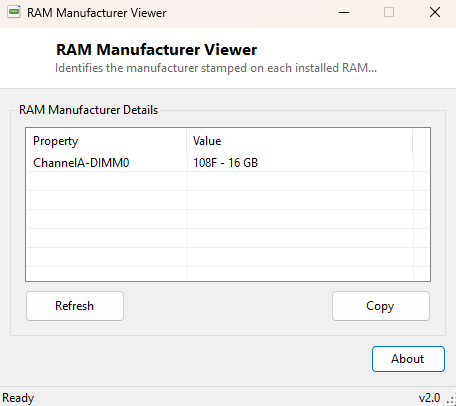
RAM Manufacturer Viewer identifies exactly which manufacturer produced each memory module currently installed in your system, listed per DIMM slot along with its capacity. Opening a case and reading tiny printed text on a memory stick's label is not always practical — laptops in particular often hide RAM behind panels that void a warranty to open — and this tool reads the same identification data directly from the module's own SPD chip through Windows, without ever touching the hardware physically.
Key Features
- Lists the manufacturer of every populated memory slot
- Shows each module's capacity alongside its manufacturer
- Labels each entry with its physical DIMM slot location (DeviceLocator)
- Works across desktops and laptops identically
- No scanning delay — reads instantly on launch
- One-click copy of the full report to the clipboard
Why You Might Need This Tool
Buying additional RAM to expand a system works far more reliably when you know exactly what is already installed, since mixing memory from different manufacturers can sometimes introduce subtle timing or stability quirks even when capacity and speed nominally match. This tool is also useful simply for confirming what is actually inside a pre-built or hand-me-down PC before making any purchasing decisions, without needing to physically open the case.
How It Works
The tool queries Win32_PhysicalMemory through WMI, which reads directly
from each installed module's SPD (Serial Presence Detect) EEPROM chip — a small
memory chip built into every RAM stick that stores its own identification data,
including manufacturer, part number, capacity and timing information. The tool reads
DeviceLocator (the physical slot label), Manufacturer and
Capacity for each populated slot, converting the raw byte capacity value
into a readable gigabyte figure.
How to Use It
Open the tool and every populated memory slot's manufacturer and capacity appear immediately. Use Copy to place the report on the clipboard when researching a compatible upgrade module or confirming installed hardware before a sale or purchase.
System Requirements & Notes
Runs on 64-bit Windows 10 and Windows 11 and needs no administrator rights, since SPD data is readable through WMI by any standard user account.
Frequently Asked Questions
Why does the manufacturer show as a generic code rather than a brand name?
Some memory modules, particularly from smaller or OEM-only manufacturers, populate the
SPD manufacturer field with a generic JEDEC vendor code rather than a consumer-facing
brand name — this is a limitation of what the module itself reports, not of this tool.
Can mixing manufacturers cause problems?
Not usually, as long as capacity, speed and voltage are compatible, but for guaranteed
stability many enthusiasts still prefer matched kits from a single manufacturer,
particularly for dual or quad-channel configurations.
Does this tell me if I have empty slots available for expansion?
Not directly — see RAM Slot Checker, which compares
populated slots against total available slots.