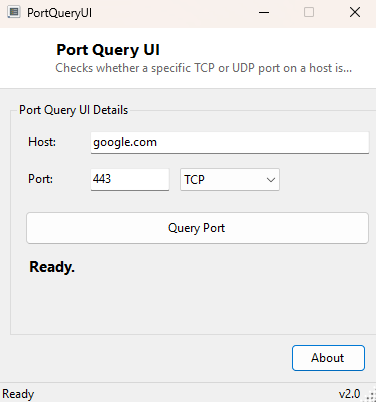
Overview
"Is the port open?" is one of the most common questions in network troubleshooting, and answering it correctly requires actually attempting a connection rather than guessing from a firewall rule list that may or may not reflect what is really happening. PortQueryUI does exactly that for a single host and port at a time, attempting a real TCP or UDP connection and reporting back whether it succeeded, was actively refused, or simply timed out — three outcomes that mean genuinely different things and point troubleshooting in different directions.
Key Features
- Separate TCP and UDP query modes selectable from a dropdown
- Clear three-way result: open, closed/filtered, or (for UDP) inconclusive
- Color-coded result label — green for open, red for closed, amber for inconclusive UDP results
- Configurable target host and port, accepting both hostnames and IP addresses
- Runs asynchronously so the interface never freezes while waiting on a timeout
Why You Might Need This Tool
Server administrators use tools like this constantly when standing up a new service — confirming a web server is actually reachable on port 443 from outside the local network, or that a database port was correctly opened through a firewall rule rather than assumed to be open because the rule "looked right" in the configuration file. It is equally useful from the other direction, confirming that a port you believe you closed is genuinely no longer accepting connections rather than trusting a firewall dashboard that may not reflect the actual running configuration. For anyone debugging "why can't my application connect," checking the specific port directly with PortQueryUI is almost always a faster diagnostic step than working through an entire network configuration from scratch.
How It Works
For a TCP query, the tool creates a System.Net.Sockets.TcpClient and
calls ConnectAsync against the target host and port, racing that task
against a three-second Task.Delay using Task.WhenAny. If
the connection task wins the race and the client reports connected, the port is
reported open; if the delay wins first, or the connection is actively refused, it is
reported closed or filtered. TCP gives a reliable open/closed answer because the
protocol itself requires an explicit handshake or an explicit refusal (a "connection
refused" RST packet). UDP is fundamentally different and the tool is honest about
that limitation: it sends a single UDP datagram via
UdpClient.Send and waits up to two seconds for any response. Because
UDP has no built-in handshake, many genuinely open UDP services simply do not reply
to an unexpected probe packet at all — so a lack of response is reported as
"open|filtered — inconclusive" rather than confidently claimed as closed, which
would be a real risk of a false result.
How to Use It
Enter the target host or IP address and the port number, choose TCP or UDP from the dropdown, and click Query Port. The result appears within a few seconds, color-coded for a quick read. For UDP queries, treat an "inconclusive" result as genuinely inconclusive rather than assuming the port is closed — a TCP query against a related service on the same host is often a more reliable way to confirm a server is reachable at all.
System Requirements & Notes
Requires no administrator privileges and an active network connection to the target host. Results reflect only what your machine can observe from its own network position — a port that appears closed from inside a corporate network might be open from the public internet, or vice versa, depending on firewall rules along the path.
Frequently Asked Questions
Why does my UDP query always come back inconclusive?
This is expected for most UDP services, since they are not required to respond to an
unsolicited probe packet. UDP port checking is inherently less reliable than TCP for
exactly this reason.
Can I scan every port on a host at once?
No — PortQueryUI checks one port at a time by design, keeping it a precise diagnostic
tool rather than a broad scanner. For subnet-wide device discovery, see
MAC Address Scanner.
Does a "closed" result mean the service isn't running?
Not necessarily — it could also mean a firewall between you and the host is dropping
or rejecting the connection before it ever reaches the service itself.