Overview
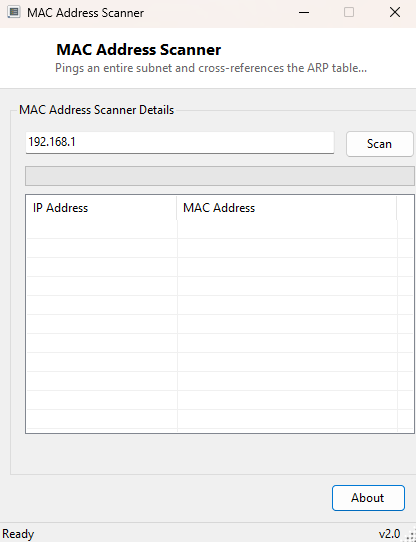
"What is actually connected to my network right now?" is a question the built-in Windows Network and Sharing Center answers badly at best. MAC Address Scanner answers it directly: give it a subnet prefix like 192.168.1, and it sweeps every address in that range, then cross-references the results against the ARP cache to produce a clean table of every IP address that responded, alongside the physical MAC address behind it. It is a lightweight, single-purpose version of the network discovery step that larger network-management suites bury inside much heavier tooling.
Key Features
- Sweeps all 254 host addresses in a /24 subnet in parallel for speed
- Cross-references live ARP cache entries to map each responding IP to its MAC address
- Simple two-column results table: IP Address and MAC Address
- Progress bar shows scan completion in real time
- No agent or scanning software needs to be installed on target devices
- Works entirely from standard ICMP ping and the local ARP table — no special network privileges required
Why You Might Need This Tool
The most common use is simply figuring out what is on your home or small-office network — confirming a smart TV, a printer, or an unfamiliar IoT device actually belongs to you and isn't an unexpected guest, since a MAC address's vendor prefix (the first three bytes) often reveals the manufacturer even without knowing the device's hostname. It is equally useful when troubleshooting an IP conflict: two devices on the same subnet claiming the same address is much easier to diagnose once you can see every responding host's MAC address side by side. Network administrators use tools like this constantly during initial site surveys, before any heavier management software is deployed, simply to get a fast first inventory of what physically exists on a segment.
How It Works
The scan works in two stages. First, it fires off 254 concurrent ICMP echo requests
(one per host, 1 through 254) using System.Net.NetworkInformation.Ping
wrapped in parallel Task.Run calls, each with a short 300-millisecond
timeout, and waits for all of them to complete via Task.WhenAll. A
successful ping is not actually required for a host to appear in the final results
— its real purpose is to populate the operating system's ARP cache, since Windows
only learns a device's MAC address after some network traffic (even a failed or
filtered ping) has been exchanged with it. Once the sweep finishes, the tool shells
out to the standard arp -a command, captures its text output, and
parses each line for entries whose IP address starts with the subnet prefix you
specified, extracting the IP and MAC address pair from the fixed-width columns ARP
prints. The result is a live snapshot built entirely from standard, unprivileged
Windows networking commands — no raw sockets, no packet capture driver, and nothing
that requires administrator rights.
How to Use It
Enter your subnet prefix in the format 192.168.1 (without the trailing
dot or host number) and click Scan. The progress bar advances as
the 254 pings complete, and once finished, the results table populates from the ARP
cache. Devices that were already communicating on the network before the scan
started will reliably appear; devices with firewalls blocking ICMP may still show
up if any other traffic touched them recently, but are not guaranteed to.
System Requirements & Notes
Runs on 64-bit Windows 10/11 and requires no administrator rights — both ICMP ping
and reading the local ARP table via arp -a are standard-user
operations. The scan only covers the local subnet reachable from your current
network adapter; it cannot see devices behind a separate router or VLAN.
Frequently Asked Questions
Why do some devices I know are online not appear?
A device with a firewall that silently drops ICMP echo requests, and that has not
exchanged any other traffic with your PC recently, may not have an ARP entry yet.
Browsing to it directly (for example opening a printer's web interface) before
re-scanning usually makes it appear.
Does this work on subnets other than /24?
The scan assumes a standard 254-host /24 range. Larger or non-standard subnets are
not currently swept automatically.
Can this see devices on a different VLAN or behind a router?
No — ARP is a local-segment protocol by design, so this tool can only discover
devices on the same broadcast domain as the PC running it.