Overview
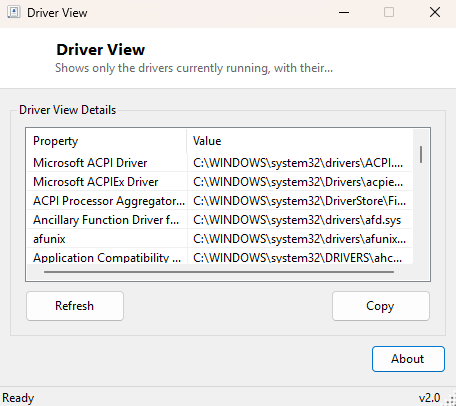
Driver View is the focused counterpart to Installed Drivers List — instead of showing every driver Windows has ever registered, it shows only the ones actually running right now, together with the on-disk file path each one loaded from. That second piece of information, the actual file path, is the detail Installed Drivers List deliberately leaves out and this tool exists specifically to provide, because knowing a driver is "Running" only tells you half the story — knowing exactly which file on disk it came from is what you need when you are hunting for a rogue, outdated, or unexpectedly-located driver file.
Key Features
- Shows only currently-running kernel-mode drivers, filtering out everything stopped or disabled
- Displays the on-disk file path for each running driver
- Much shorter, more focused list than a full driver enumeration
- No hardware-category grouping — a flat, name-sortable view
- Instant refresh with no dependency on Device Manager's UI
- Purely read-only, safe to run at any time without risk
Why You Might Need This Tool
The file path is what makes this tool useful in ways a state-only list is not. If
you suspect a driver has been replaced by an outdated or third-party version, seeing
the exact path it loaded from — inside System32\drivers, in a vendor's
installation folder, or somewhere unusual — tells you immediately whether it is a
legitimate in-box Windows driver or something a specific application installed. It
is also useful for confirming exactly which physical file corresponds to a driver
name you have found referenced in a crash dump or an Event Log entry, since crash
analysis tools frequently reference a driver by file name rather than by its Windows
service display name.
How It Works
Driver View queries the same Win32_SystemDriver WMI class as Installed
Drivers List, but adds a WHERE State='Running' filter directly in the
WQL query so only active drivers are returned in the first place, rather than
filtering a full list client-side. Alongside DisplayName it requests the
PathName property, which WMI populates from the same service
configuration data the Service Control Manager uses internally to locate and load
each driver binary at boot or on demand.
How to Use It
Open the tool and the currently-running driver list appears immediately with each entry's file path shown alongside its name. There are no filters or settings to adjust — the "only running" filter is the entire point of this tool, and switching to a full unfiltered list is exactly what Installed Drivers List is for instead.
System Requirements & Notes
Runs on 64-bit Windows 10 and Windows 11 without administrator rights. Like its companion tool, this is entirely read-only and cannot modify driver state.
Frequently Asked Questions
Why is this list so much shorter than Installed Drivers List?
Because most registered drivers on a typical Windows install are set to Manual or
Disabled start mode and only load on demand — the actual number of drivers running
at any given moment is a small fraction of everything registered.
Can I open the file path directly from this tool?
Not in this version — copy the path from the list and open it in File Explorer or
use SpecialFoldersView if you need to
quickly navigate to the containing system folder.