Overview
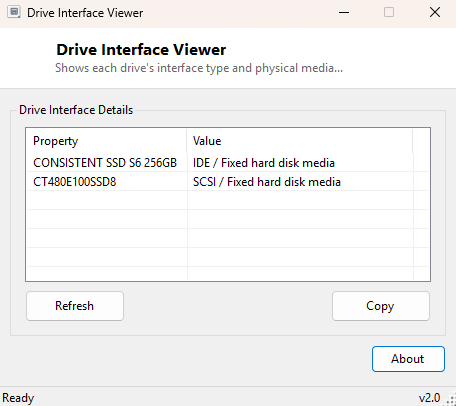
Drive Interface Viewer answers a question that becomes surprisingly important the moment you are shopping for an upgrade or diagnosing sluggish disk performance: what physical interface is each of your drives actually connected through, and what kind of media is it? A drive can be SATA, NVMe, USB, SCSI or IDE, and it can be a traditional spinning platter, a solid-state drive, or an external removable disk — and Windows' own tools bury this combination across several different dialogs. This tool reads both pieces of information together, per drive, in one flat list.
Key Features
- Lists every physical disk drive attached to the system by model name
- Shows each drive's interface type (SATA, NVMe, USB, IDE, SCSI)
- Shows each drive's media type classification as reported by its driver
- Works for both internal and externally connected drives
- Copy-to-clipboard for the full report
Why You Might Need This Tool
The most common use is pre-purchase verification — before buying an NVMe SSD upgrade, confirming that the slot you intend to use is genuinely wired for NVMe and not a SATA-only M.2 slot that happens to share the same physical connector shape (a surprisingly common and expensive mistake on budget motherboards). It is equally useful when a drive is behaving slower than expected — if a drive you believed was running over NVMe actually shows as SATA or, worse, is bottlenecked through a USB bridge chip because of a loose or wrong cable, that misconfiguration becomes obvious immediately rather than after an hour of unrelated troubleshooting. It also helps when cataloguing a multi-drive system before a rebuild, so you know in advance which physical bay corresponds to which interface and drive letter.
How It Works
The tool queries Win32_DiskDrive through WMI for the
Model, InterfaceType and MediaType fields of
every physical disk. InterfaceType is reported directly by the storage
driver stack and reliably distinguishes SATA, NVMe (often reported as "SCSI" at the
WMI layer, a known quirk since NVMe drives present through a SCSI-miniport-style
driver interface even though the physical connection is PCIe), USB and IDE.
MediaType supplements this with the driver's own classification string,
such as "Fixed hard disk media" or "External hard disk media." Because this reads
directly from the storage driver enumeration Windows already maintains, it requires
no polling of the physical drive itself and returns instantly even for drives that
are spun down or in a low-power state.
How to Use It
Open the tool and every attached physical drive appears immediately with its model name followed by "InterfaceType / MediaType", for example "Samsung SSD 970 EVO Plus: SCSI / Fixed hard disk media" for an NVMe drive, or "WD My Passport: USB / External hard disk media" for a USB external drive. Cross-reference the model name against your system's known drive layout to confirm each bay or slot is wired the way you expect.
System Requirements & Notes
Runs on 64-bit Windows 10 and Windows 11, no administrator rights required — reading disk drive inventory through WMI is available to any standard user account.
Frequently Asked Questions
My NVMe SSD shows "SCSI" as its interface — is that wrong?
No, this is expected and normal. NVMe drives are exposed to Windows' storage stack
through a SCSI-miniport-compatible driver model even though the physical connection
is PCIe, so Win32_DiskDrive reports "SCSI" for essentially all NVMe
drives regardless of manufacturer.
Does this tool show drive speed or throughput?
No — it identifies interface and media type only. For live activity and throughput,
see Drive Activity Monitor elsewhere in
this catalog.