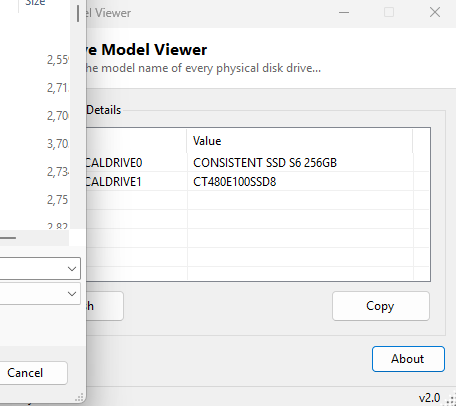
Overview
Every physical disk drive reports a model string to Windows the moment it is connected, but there is no single, obvious place in the stock Windows interface to see that string cleanly — Device Manager buries it several clicks deep, and Disk Management shows only a drive number rather than the actual model name. Drive Model Viewer lists the model name of every physical disk currently attached to the system, internal and external alike, in one simple table.
Key Features
- Lists the exact model string reported by every physical disk drive
- Shows the Windows device ID alongside each model for cross-referencing
- Covers internal SATA/NVMe drives and externally connected USB drives alike
- Updates immediately when a drive is hot-plugged and you hit Refresh
Why You Might Need This Tool
Model identification matters most in the moments you least want to be guessing — checking a drive's warranty status on a manufacturer's site, searching for a firmware update, confirming which physical drive a support technician is referring to over the phone, or simply figuring out what is actually installed in a PC you did not build yourself. Rather than opening the case or digging through Device Manager's nested property pages, this tool gives you every attached drive's exact model string in one glance, ready to copy and paste into a search box or a support ticket.
How It Works
The tool queries Win32_DiskDrive through WMI, reading the
Model field directly — this is the same identity string the drive's own
firmware reports over the SATA, NVMe or USB command set during enumeration, so it
matches exactly what a tool talking to the drive at a lower level, or the
manufacturer's own diagnostic software, would report. The accompanying
DeviceID field is shown alongside it as a stable Windows-internal
reference for the same physical drive, useful when cross-referencing against
Device Manager or Disk Management.
How to Use It
Open the program and every attached drive's model appears immediately, with no configuration required. Plug in an external drive and click Refresh to add it to the list without restarting the program.
System Requirements & Notes
Runs on 64-bit Windows 10/11 with no administrator rights required — reading drive identity through WMI is a standard-user operation regardless of interface type.
Frequently Asked Questions
Will this show drives connected through a USB dock or hub?
Yes, as long as Windows itself recognizes the drive and assigns it a physical disk
entry, which is true for the overwhelming majority of USB storage enclosures and
docking stations.
Does the model string include the drive's capacity?
Sometimes — many manufacturers embed capacity in the model string itself, but for a
guaranteed, explicit capacity reading use
Drive Capacity Checker alongside this tool.
Can this identify a drive that Windows can't initialize?
If Windows can enumerate the drive at all — even an uninitialized or unformatted
one — its model string is almost always still readable, since model reporting
happens at the hardware enumeration level, before any filesystem is involved.