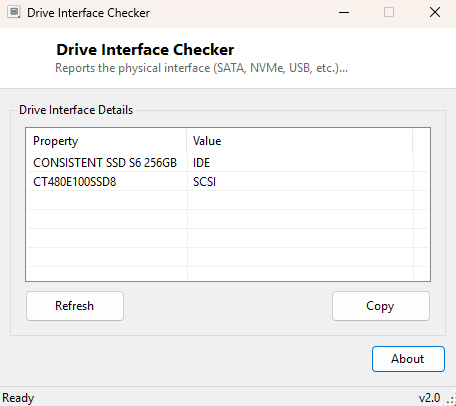
Overview
Drive Interface Checker reports the physical connection type — SATA, NVMe, USB, IDE or another interface — that each attached drive is using. It is a small, single-purpose companion to the deeper Disk / Storage tools in this catalog for the moments you just need one quick fact: is this drive actually running on the fast interface you paid for, or is it plugged into something slower than expected.
Key Features
- Lists every physical disk drive attached to the system
- Reports the interface type each drive is connected through
- Distinguishes internal SATA/NVMe drives from USB-attached external storage
- Instant results with no configuration needed
- Completely read-only
Why You Might Need This Tool
A new NVMe SSD that benchmarks far below its rated speed is sometimes simply installed in the wrong M.2 slot — one wired for SATA rather than PCIe — and this is often the fastest way to confirm that before troubleshooting further. It is also useful for quickly distinguishing which of several attached drives is external (USB) versus internal, especially on desktops with multiple bays or laptops with several external drives connected at once.
How It Works
The tool queries WMI's Win32_DiskDrive class and reads the
InterfaceType property reported for each physical disk — the same
field Windows' own Device Manager and Disk Management populate from. Values
typically returned include SCSI (commonly used for NVMe and many
modern SATA controllers reporting through a SCSI miniport driver), IDE
for legacy or some SATA-in-AHCI-mode configurations, and USB for
external drives — each model name is listed alongside its reported interface for
clarity.
How to Use It
Run the tool and every attached drive appears with its model name and interface type. Plug in or remove an external drive and click Refresh to see the list update accordingly.
System Requirements & Notes
Runs on Windows 10 and 11 x64 without administrator rights. Note that WMI's
InterfaceType field reports the driver-level interface classification
rather than the exact physical connector — a drive on a modern NVMe controller
will often still show as SCSI, which is expected and not an error.
Frequently Asked Questions
Why does my NVMe SSD show "SCSI" instead of "NVMe"?
This is normal — Windows' storage driver stack commonly reports NVMe and some SATA
controllers through a SCSI-compatible interface classification at the WMI level,
regardless of the drive's actual physical connection.
Does this tell me the drive's transfer speed?
No, only the interface classification. See
Drive Activity Monitor for live
read/write throughput figures.