Overview
The PATH environment variable is one of the most important and most quietly broken settings on any Windows machine. Every time you type a command name into a terminal without a full path, Windows searches every folder listed in PATH, in order, until it finds a matching executable — and when that search comes up empty, or worse, finds the wrong version of a tool because an old folder still sits ahead of a newer one, the resulting error messages rarely point back to PATH as the actual cause. Windows PATH Checker exists to make that invisible list visible, and to flag the two problems that cause the most confusion: folders that no longer exist, and folders that have been added more than once.
Developers accumulate PATH clutter constantly — every SDK installer, every version manager, every "just add it to PATH" step in a setup guide adds another entry, and almost none of them ever get cleaned up when the software is uninstalled. This tool turns an audit that would otherwise mean manually reading through Environment Variables in System Properties into a five-second glance.
Key Features
- Lists every folder currently in the PATH environment variable
- Flags entries pointing to folders that no longer exist on disk
- Detects duplicate entries (case-insensitive) cluttering the list
- Shows a running total of PATH entries and duplicate count
- Reads the effective PATH for the current process, matching what a new terminal actually sees
- No changes are made — purely a diagnostic report
Why You Might Need This Tool
"Command not found" and "wrong version ran" bugs are the classic symptoms this tool is built to diagnose. A missing folder in PATH means a command you expect to work suddenly does not, usually right after uninstalling or moving a piece of software. A duplicate or wrongly ordered entry means the wrong version of a tool silently runs instead of the one you actually intended — a maddening class of bug because the command appears to work, it just does the wrong thing. Developers juggling multiple SDK versions, Python installations, or Node version managers hit this constantly, and a quick PATH audit is often the fastest way to confirm whether the environment itself is the problem before spending time debugging the application.
How It Works
The tool reads Environment.GetEnvironmentVariable("PATH"), which
returns the same semicolon-delimited string a newly launched process would
inherit — the effective, already-merged combination of the machine-level and
user-level PATH settings Windows applies at process startup. That string is split
on the semicolon delimiter into individual folder entries, filtered to drop blank
entries left behind by trailing or doubled semicolons. Each surviving entry is
then checked with IO.Directory.Exists to confirm the folder is
actually present on disk, and the full list is grouped case-insensitively to
surface any entry that appears more than once — comparing paths in lowercase since
Windows paths are not case-sensitive in practice even though the raw string
comparison would otherwise treat differently-cased duplicates as unique.
How to Use It
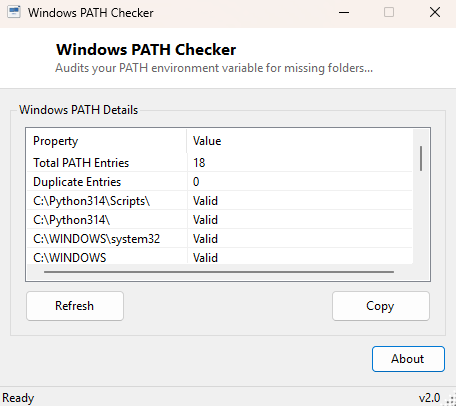
Open the tool and every PATH entry is listed immediately, each marked Valid or MISSING depending on whether the folder exists. The total entry count and duplicate count are shown at the top. There is nothing to configure — just review the list, note any entries flagged as missing or duplicated, and clean those up through System Properties » Environment Variables if you want to tidy PATH itself.
System Requirements & Notes
Runs on 64-bit Windows 10 and Windows 11 and requires no administrator rights — reading your own process's environment variables and checking folder existence are both standard-user operations.
Frequently Asked Questions
Can this tool edit or clean up PATH for me?
No, it is read-only by design, specifically because PATH is sensitive enough that
an automatic edit could break other software depending on entry order — it reports
problems clearly so you can fix them deliberately.
Does it show the Machine and User PATH separately?
No, it shows the combined, effective PATH exactly as a new process would see it,
which is the version that actually matters when you run a command.
Why does a folder show as missing when I can see it in Explorer?
Double-check for a trailing backslash, extra spaces, or a typo in the PATH entry
itself — these are extremely common and cause an otherwise-correct-looking path to
fail the existence check even though a visually similar folder does exist.