Overview
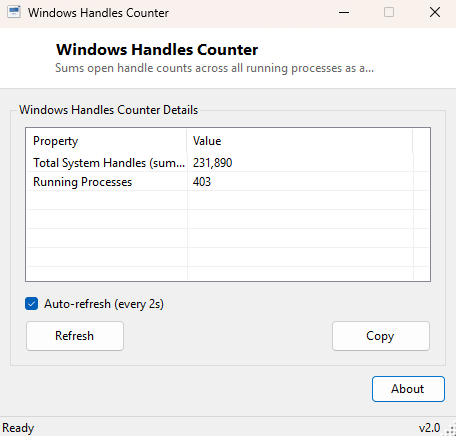
Every open file, registry key, thread, window, mutex and dozens of other kernel objects a Windows process touches is tracked internally as a "handle" — a lightweight reference the process holds until it explicitly closes it or exits. Under normal conditions the total handle count across a system rises and falls smoothly as programs open and close. When a poorly-written application has a handle leak — repeatedly opening handles and forgetting to close them — the total count climbs steadily over hours or days until the system runs low on available handles and starts behaving erratically. Windows Handles Counter exists to make that total number visible as a simple, continuously updating live figure, exactly the kind of long-running health indicator Task Manager does not surface directly.
This is a monitoring tool rather than a diagnostic one — it does not identify which specific process is responsible for a leak, but it is the fastest possible way to notice that something, somewhere, is quietly leaking resources before the symptom becomes an actual crash or slowdown.
Key Features
- Live-updating total handle count summed across every running process
- Refreshes automatically on a short interval so a slow climb becomes visible over time
- Also reports the current total number of running processes for context
- No configuration needed — launch it and the count starts immediately
- Minimal CPU overhead, safe to leave running in the background for hours
- Gracefully skips any process it cannot query rather than stopping the count
Why You Might Need This Tool
System administrators managing long-running servers or kiosk-style always-on machines are the classic audience — leaving this tool running (or checking it periodically) makes a slow handle leak visible days before it would otherwise surface as an unexplained slowdown or a service that mysteriously stops accepting new connections. Developers debugging their own applications for resource leaks during a long test run can watch the system-wide total before, during and after a stress test to confirm whether their process is the culprit. It is also a useful sanity check after installing new background software or a driver update, to confirm the addition has not introduced a leak that only shows up after extended uptime.
How It Works
On each refresh tick, the tool calls Process.GetProcesses() to
enumerate every currently running process, then reads each one's
HandleCount property — a value .NET's Process class retrieves directly
from the same underlying Windows API (GetProcessHandleCount) that
Task Manager's own "Handles" column uses, just not summed or displayed anywhere by
default. The tool accumulates these per-process counts into a single running total
and displays it alongside the total process count. Because some processes
(particularly protected system processes) refuse handle-count queries from a
standard-user context, those individual queries are wrapped so a single
inaccessible process does not interrupt the overall tally — it is simply skipped
and the count continues from the processes that are readable.
How to Use It
Launch the tool and leave it running in a corner of the screen, or minimized, while you work normally or run whatever long-duration test you are investigating. Watch the total handle count over time: a number that holds roughly steady or fluctuates within a normal range is healthy, while a total that climbs steadily and never comes back down, even after the applications you were using have closed, is the signature of a handle leak somewhere on the system.
System Requirements & Notes
Windows Handles Counter runs on 64-bit Windows 10 and Windows 11 and does not require administrator privileges for its core function, though running elevated will let it successfully query a small number of additional protected system processes that a standard-user session cannot see into, producing a slightly more complete total.
Frequently Asked Questions
Can this tell me which process is leaking handles?
Not directly — it reports the system-wide total rather than a per-process
breakdown. Once you know a leak exists, Task Manager's Details tab (with the
Handles column enabled) or Windows' own Resource Monitor can help narrow down which
specific process is responsible.
What's a "normal" handle count for a typical PC?
There is no single correct number — it scales with how many applications and
background services are running, and can reasonably range from a few thousand on a
lightly-loaded machine to well over ten thousand on a busy one. The trend over time
matters far more than the absolute figure at any single moment.
Does leaving this running use significant resources itself?
No — enumerating processes and reading a handle count is a lightweight operation,
and the tool's own footprint is negligible even left running continuously.