Overview
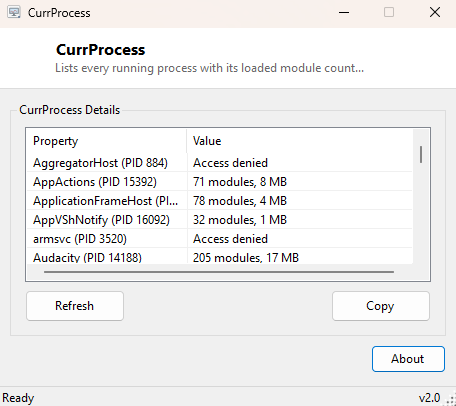
CurrProcess is a compact, fast-loading process lister in the spirit of the classic NirSoft utility of a similar name — a plain table of every currently running process, how many modules (DLLs) each one has loaded, and how much memory it is using, without the extra columns, graphs and tabs a full Task Manager replacement carries. It exists for the moments you want a quick answer to "what's running and how much memory is it using" and don't want to wait for a heavier tool to load.
Key Features
- Lists every running process with its process ID
- Shows loaded module (DLL) count per process
- Shows working-set memory usage in megabytes per process
- Sorted alphabetically by process name for fast scanning
- Opens and populates almost instantly, with no splash screen or background service
Why You Might Need This Tool
A quick process-and-module inventory is useful in more situations than it might first seem. Confirming that a specific application is actually running (and under what exact process name) before troubleshooting further is the most common case. The module count column is a fast, rough proxy for "how complex is this process" — a process suddenly showing a much higher module count than usual can be a useful early signal worth investigating further with a more detailed tool like Opened Files View. And because CurrProcess opens near-instantly with no loading delay, it is genuinely faster than Task Manager for the simple case of "is this thing still running" during a script or automation loop.
How It Works
CurrProcess calls the standard .NET Diagnostics.Process.GetProcesses() API to
enumerate every process visible to the current user session, then sorts the results
alphabetically by ProcessName. For each process it reads
.Modules.Count (the number of loaded DLLs and other executable modules) and
.WorkingSet64 (the physical memory currently charged to that process,
converted to megabytes for readability). Because reading another process's module list
requires the same access level Windows enforces for any inter-process inspection, a small
number of protected system processes will report "Access denied" instead of real numbers
— the tool catches that specific exception per-process and displays it plainly rather than
letting one protected process crash the whole listing.
How to Use It
Launch the tool; the full process list populates immediately with no further action needed. Scroll or resize the window to scan for a specific process name. There is no search box by design — for a list this size, scrolling and reading is typically faster than typing a filter for a one-off check.
System Requirements & Notes
Runs without administrator rights for the vast majority of processes; a small number of protected system and antimalware-related processes will show "Access denied" for their module count regardless of privilege level, which is expected Windows behavior rather than a limitation of this tool.
Frequently Asked Questions
Can I end a process from this window?
No — CurrProcess is read-only by design. For ending a process, see
System Processes Mini Viewer, which adds
an End Task button alongside a similarly compact list.
Does the list auto-refresh?
No, it is a one-time snapshot taken when the window opens; close and reopen the tool (or
use System Processes Mini Viewer, which does auto-refresh) if you need to watch the list
change over time.