Overview
Windows communicates a huge number of its internal failures purely as numbers — error 5, error 1223, 0x80070005, and hundreds of others — leaving it up to the user to translate a bare code into an actual explanation. System Error Code Lookup does exactly that translation instantly: type in any Win32 error code, in either decimal or hexadecimal form, and it returns the exact plain-English message Windows itself associates with that code, using the same lookup table the operating system consults internally when it needs to show a human-readable error string.
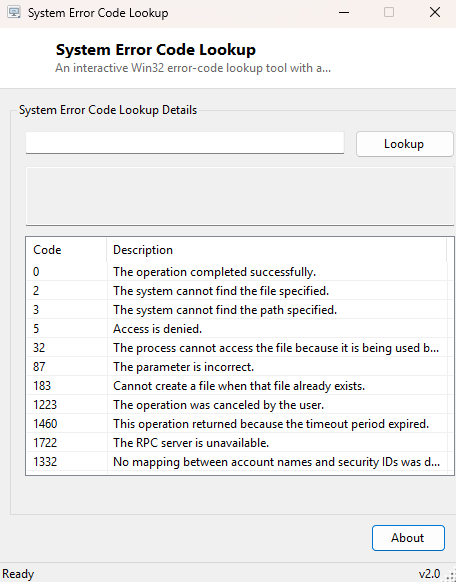
Alongside the interactive lookup, the tool ships with a small built-in reference table of the codes people run into most often — permission-denied errors, path-not- found errors, cancellation codes and a handful of others — pre-decoded and visible the moment you open the window, so many common lookups need no typing at all.
Key Features
- Accepts error codes in either decimal (5) or hexadecimal (0x80070005) format
- Returns the exact system-defined message text for any valid Win32 error code
- Built-in reference table of the most frequently encountered common codes
- Shows both the decimal and hex representation of whatever code you look up
- Instant results with no internet connection required — everything resolves locally
- Handles invalid or unrecognized codes gracefully with a clear "no description available" message
Why You Might Need This Tool
Error codes surface constantly in places that give you nothing but the number — a failed script's exit code, a line buried in a log file, a cryptic message box from an older application that never bothered to format its own errors nicely. Rather than searching the web and hoping a forum post happens to explain that specific code correctly, this tool gives you the authoritative Windows-defined text in seconds, straight from the source. IT support staff fielding a user's description of "it just says error 1223" benefit enormously from being able to translate that instantly into "The operation was canceled by the user" and immediately understand what actually happened, rather than guessing.
How It Works
The tool calls the Windows FormatMessage API directly, passing the
FORMAT_MESSAGE_FROM_SYSTEM flag to tell it to resolve the code against
Windows' own built-in system message table rather than a module-specific one, along
with FORMAT_MESSAGE_ALLOCATE_BUFFER so Windows allocates and returns
the message string directly. This is the identical mechanism the operating system
itself uses internally whenever it needs to convert a raw GetLastError()
result into the readable text shown in a system dialog box — the tool is simply
exposing that same lookup as a small, standalone, always-available utility rather
than requiring you to trigger the actual error again to see its description pop up
naturally somewhere in the OS.
How to Use It
Type any error code into the input box — either the plain decimal number or a
hex value prefixed with 0x — and click Lookup. The
result box immediately shows the code in both formats alongside its full message
text. For a handful of the codes people search for most often, just glance at the
built-in reference table below the lookup box; several everyday support scenarios
are already listed there without typing anything.
System Requirements & Notes
System Error Code Lookup runs on 64-bit Windows 10 and Windows 11 and does not
require administrator privileges — resolving an error code through
FormatMessage is a standard-user, read-only operation with no system
impact whatsoever.
Frequently Asked Questions
Does this cover HRESULT codes as well as plain Win32 error codes?
Many common HRESULT values (like 0x80070005, which is simply Win32
error 5, "Access is denied," wrapped in HRESULT form) resolve correctly since they
share the same underlying system message table; highly specialized COM-specific
HRESULTs from individual applications may not have a system-level description.
What does it show for a code that doesn't exist?
A clear "no description available for this code" message rather than a blank
result or a crash, so you know immediately the lookup genuinely found nothing
rather than silently failing.
Is this the same as Error Lookup elsewhere on this site?
They share the same underlying FormatMessage technique — see
Error Lookup for a version built around browsing a
static reference list, while this tool is built around interactive single-code
lookups with that same reference table included for convenience.