Overview
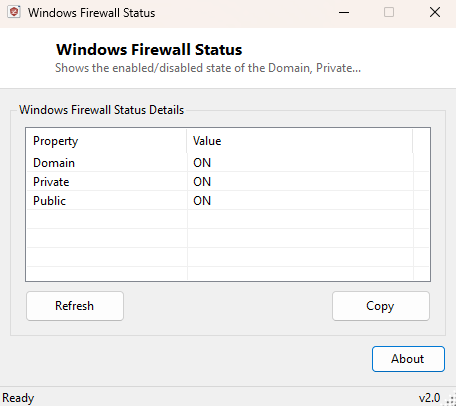
Windows maintains three completely separate firewall profiles — Domain, Private and Public — and each one can independently be switched on or off, a fact that surprises a lot of people who assume "the firewall" is a single on/off switch. Windows Firewall Status reports the enabled/disabled state of all three profiles in one glance, without navigating through Windows Security's several layers of settings pages to find each one individually.
This is a pure status-reporting tool. It does not toggle the firewall on or off itself, add or remove rules, or open any ports — for that level of control, Windows' own Windows Security app or the more advanced Windows Defender Firewall with Advanced Security console remain the right tools. This utility exists purely to answer, quickly and clearly, "is my firewall actually on right now."
Key Features
- Reports enabled/disabled state for Domain, Private and Public firewall profiles separately
- Reads the exact same data the Windows Firewall console itself displays
- Single-window, at-a-glance layout — no navigating nested settings pages
- Works without opening the full Windows Security application
- Fast — results appear within a second of launching
- Read-only reporting; makes no changes to firewall configuration
Why You Might Need This Tool
The most common reason to check firewall status directly is troubleshooting a profile mismatch — Windows classifies every network you connect to as Domain, Private or Public, and it is easy to have the firewall correctly enabled on your home network's Private profile while a public Wi-Fi connection quietly falls under a Public profile with different rules, or vice versa after a network gets misclassified. IT support staff and anyone auditing a machine's security posture before connecting it to a sensitive network also benefit from a fast, unambiguous answer rather than having to walk someone else through several settings screens over the phone to confirm the same thing. It is also a useful sanity check after installing third-party security software, some of which disables the built-in Windows Firewall in favor of their own — confirming which profiles are actually still active avoids assuming protection that is not really there.
How It Works
The tool launches the built-in netsh.exe advfirewall show allprofiles
state command via Diagnostics.Process and captures its output
— the same command-line query the Windows Firewall console itself is built on top
of. It then parses that output looking for each "... Profile Settings:" header
line to identify which profile the following lines belong to, and the "State"
line immediately after each header to extract that profile's ON or OFF value,
pairing the two together for display. Using netsh directly rather
than a lower-level firewall API keeps the tool's output guaranteed consistent with
what an administrator would see running the identical command manually from an
elevated prompt.
How to Use It
Launch the tool and all three profile states populate automatically. There is nothing to configure — simply read the Domain, Private and Public rows to see which profiles currently have their firewall enabled. Re-launch the tool after changing network connections or firewall settings to see the updated state.
System Requirements & Notes
Runs on 64-bit Windows 10 and Windows 11. Reading firewall profile state via
netsh advfirewall show allprofiles state does not require
administrator rights on a standard configuration — the same query works from an
unelevated prompt. This tool reports whether each profile's firewall is switched
on, not the specific inbound/outbound rules configured within it; reviewing
individual rules still requires the full Windows Defender Firewall with Advanced
Security console.
Frequently Asked Questions
Which profile applies to my current network?
Only the profile matching how Windows has classified your active network
connection is actually in effect at any moment — check your network's classification
(visible in Network Profile Viewer, elsewhere in this catalog) alongside this
tool's results for the full picture.
Can this tool turn the firewall back on if it's off?
No — it is read-only by design. Re-enabling a disabled profile requires Windows
Security or the netsh advfirewall set command with administrator
rights.
Does a third-party antivirus disable Windows Firewall automatically?
Some full security suites do disable it in favor of their own firewall component —
this tool will accurately reflect that state either way, since it reads the real
Windows Firewall configuration directly rather than assuming anything.