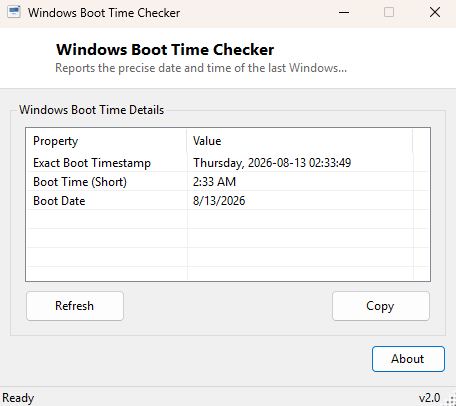
Overview
Windows Boot Time Checker reports the precise date and time your PC last started up, formatted clearly with the full day of the week, date and time. Where its companion tool Windows Uptime Monitor focuses on the running duration since that moment, this tool focuses on the moment itself — useful whenever you need to state exactly when a machine came back online rather than how long it has been running.
Key Features
- Shows the exact last-boot date and time, including day of the week
- Also displays a shortened time-only and date-only view for quick reference
- Reads directly from the same source Windows itself uses internally
- Instant, single-window result
- Read-only, makes no system changes
Why You Might Need This Tool
When documenting an incident report, confirming a scheduled maintenance restart actually happened at the expected time, or simply settling a "when did this last restart" question during a support call, having the exact boot timestamp stated clearly — rather than a relative "3 days ago" figure that keeps changing — makes for a more precise and useful record.
How It Works
The tool queries WMI's Win32_OperatingSystem class for its
LastBootUpTime property and converts the WMI CIM datetime value using
ManagementDateTimeConverter.ToDateTime(), then formats the resulting
.NET DateTime in three ways: a full timestamp with the day name
spelled out, a short time-only string, and a short date-only string, so whichever
format you need for a report or ticket is already available without further
manual formatting.
How to Use It
Open the tool and the exact boot timestamp appears immediately in all three formats. There is nothing further to configure or interact with.
System Requirements & Notes
Runs on Windows 10 and 11 x64 without administrator rights. As with the related uptime tool, this reflects the last true cold or warm boot, not a resume from sleep or hibernate.
Frequently Asked Questions
How is this different from Windows Uptime Monitor?
Both read the same underlying data — this tool emphasizes the exact boot moment
in multiple readable formats, while Uptime Monitor emphasizes the live running
duration since that moment and keeps counting while open.
Does the displayed time use my local time zone?
Yes — the WMI value is converted to local time automatically before display.