Overview
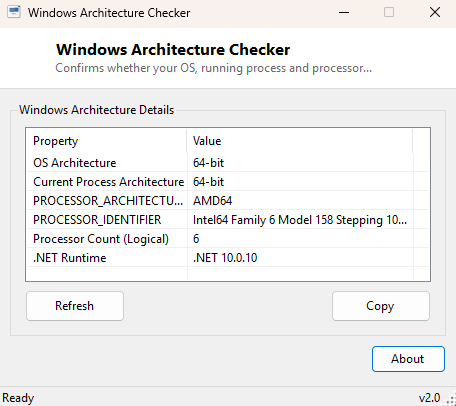
Windows Architecture Checker answers a question that trips up more people than you would expect: is this system, and the specific process asking the question, running as 32-bit or 64-bit? These are not always the same answer even on a single machine — a 64-bit Windows installation can still run individual 32-bit processes under the WOW64 compatibility layer, and installers, drivers and some troubleshooting steps care very specifically about which one applies at any given moment. This tool checks both the operating system and the currently running process, side by side, so there is no ambiguity.
Key Features
- Reports whether the operating system itself is 32-bit or 64-bit
- Separately reports whether the current running process is 32-bit or 64-bit
- Shows the raw PROCESSOR_ARCHITECTURE environment variable value
- Shows the raw PROCESSOR_IDENTIFIER environment variable string
- Displays the logical processor count as reported to managed code
- Shows the exact .NET runtime version the tool itself is running under
Why You Might Need This Tool
Driver installers, some legacy line-of-business software, and certain troubleshooting guides explicitly require you to confirm 32-bit versus 64-bit before proceeding, because installing the wrong architecture's package either fails outright or installs silently broken. It is also useful for confirming that a specific already-running program is using the 64-bit build you expect rather than an older 32-bit version that happened to still be present, since the two can coexist on the same 64-bit Windows installation without any obvious visual difference.
How It Works
Operating system architecture comes from
Environment.Is64BitOperatingSystem, and the current process's own
architecture from the separate Environment.Is64BitProcess property —
these are two genuinely different .NET properties precisely because a 64-bit OS can
still host a 32-bit process. The raw PROCESSOR_ARCHITECTURE and
PROCESSOR_IDENTIFIER environment variables are read via
Environment.GetEnvironmentVariable, giving you the exact strings Windows
itself sets for every process at launch. Logical processor count comes from
Environment.ProcessorCount, and the .NET runtime identification string
comes from System.Runtime.InteropServices.RuntimeInformation.FrameworkDescription.
How to Use It
Open the tool and every value is displayed immediately — there is no configuration or scan step. If you need to confirm architecture for a different already-running program rather than this tool itself, check that program's own Task Manager Details tab entry, since this tool can only directly report on the operating system and on itself as a running process.
System Requirements & Notes
Runs on 64-bit Windows 10 and Windows 11 and needs no administrator rights — every value shown is standard environment and runtime information available to any process.
Frequently Asked Questions
Why would a 64-bit OS run a 32-bit process?
Many older applications and installers were never rebuilt for 64-bit and still run
perfectly well under WOW64, the compatibility subsystem 64-bit Windows uses to host
32-bit executables transparently.
Is 32-bit Windows still common?
Increasingly rare on modern hardware — virtually all PCs sold in the last decade run
64-bit Windows, though some very old or low-power devices may still run a 32-bit
installation.
Does this affect which software I should download?
Yes — always match a downloaded installer's architecture to your operating system's
architecture (shown here), not necessarily to your CPU's maximum capability.