Overview
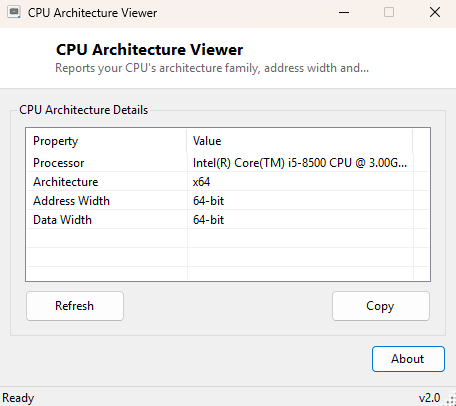
CPU Architecture Viewer reports your processor's architecture family — x86, x64, ARM64 and so on — along with its address width and data width, the low-level capability numbers that determine how much memory a processor can theoretically address and how wide its internal data paths are. This is distinct from Windows Architecture Checker, which focuses on whether the operating system and current process are 32-bit or 64-bit — this tool instead reports what the processor itself is fundamentally built as, independent of what OS happens to be running on it.
Key Features
- Translates WMI's numeric architecture code into a readable name (x86, x64, ARM, ARM64, IA64, and more)
- Shows the processor's address width in bits
- Shows the processor's data width in bits
- Displays the full processor name for cross-reference
- No scanning delay — reads instantly on launch
- One-click copy of the full report to the clipboard
Why You Might Need This Tool
With ARM-based Windows devices now a genuine part of the PC market alongside traditional x86/x64 machines, confirming a processor's true architecture family has become relevant again in a way it was not for most of the last two decades — software compiled for one architecture will not run natively on another, and emulation layers (like x64 emulation on ARM64 Windows) carry a performance cost worth knowing about before installing something. This tool gives you an unambiguous, firmware-sourced answer rather than inferring architecture from a product name that may not make it obvious.
How It Works
The tool queries Win32_Processor through WMI for Architecture
(a numeric code), AddressWidth and DataWidth. The numeric
architecture code is translated using the standard WMI mapping table: 0 for x86, 1 for
MIPS, 2 for Alpha, 3 for PowerPC, 5 for ARM, 6 for IA64, 9 for x64, and 12 for ARM64 —
a lookup table built directly into the tool so the raw code is never shown without its
human-readable meaning alongside it.
How to Use It
Open the tool and the architecture, address width and data width appear immediately. Use this before installing software or drivers that are architecture-specific, particularly on ARM64 Windows devices where not every application publishes a native build.
System Requirements & Notes
Runs on 64-bit Windows 10 and Windows 11 and needs no administrator rights — all values shown are standard WMI processor properties available to any user account.
Frequently Asked Questions
Why does this show "x64" when Task Manager shows "ARM64"?
It should not under normal circumstances, since both read from equivalent underlying
firmware data — if you see a genuine mismatch, it is worth reporting through the
Contact page with your exact hardware details.
What is the practical difference between address width and data width?
Address width determines the maximum amount of memory the processor can theoretically
reference; data width reflects the size of the processor's internal data registers and
buses — on virtually all modern x64 and ARM64 processors both values are 64 bits.
Does this tool work on ARM-based Windows devices?
Yes — the underlying WMI class and properties are available on every architecture
Windows supports, including ARM64.