Overview
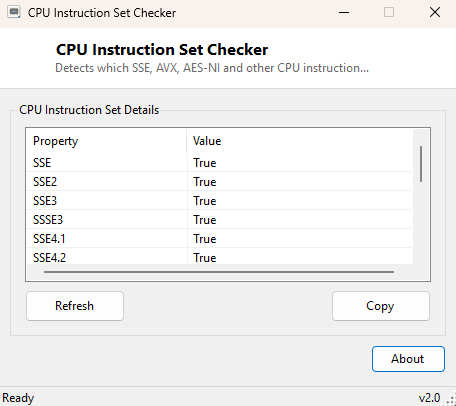
CPU Instruction Set Checker answers a question that Task Manager, Device Manager and even most system-information tools simply do not surface: which specific CPU instruction set extensions does this processor actually support at runtime. Modern x86-64 processors have accumulated decades of incremental extensions — SSE through SSE4.2, AVX, AVX2, AES-NI, FMA, BMI1/BMI2, POPCNT and more — and while the CPU model name tells you roughly which generation you are dealing with, it does not tell you definitively which of these extensions are enabled and usable right now on this exact machine. This tool checks each one directly and reports a clean yes/no list.
This matters more than it might sound. Modern software, from video encoders to machine-learning libraries to games, increasingly branches its code paths based on exactly this kind of instruction-set availability, and "why does this program say my CPU is unsupported" is a question this tool can usually answer in one glance.
Key Features
- Checks SSE, SSE2, SSE3, SSSE3, SSE4.1 and SSE4.2 support individually
- Checks AVX and AVX2 support
- Checks AES-NI hardware encryption acceleration
- Checks FMA (fused multiply-add), BMI1, BMI2 and POPCNT
- Checks PCLMULQDQ, used by hardware-accelerated CRC and GCM cryptography
- Clear, simple property/value list — one row per instruction set, one Yes/No answer each
Why You Might Need This Tool
Instruction-set questions come up constantly for anyone running specialized software: video editors and encoders that use AVX2 for a meaningful speed boost, older or budget CPUs that quietly lack AVX2 while still supporting AVX, and games or applications that flatly refuse to launch with an error mentioning "unsupported processor" rather than explaining exactly what is missing. Rather than digging through a manufacturer's spec sheet (which is not always accurate for the specific stepping you actually have) or trusting a program's own cryptic error message, this tool lets you check the ground truth directly on the machine in question in a few seconds.
How It Works
Rather than parsing CPUID feature flags manually — the traditional low-level
approach — this tool uses the managed System.Runtime.Intrinsics.X86
namespace built into modern .NET, calling the static
IsSupported property on each relevant class:
Sse, Sse2, Sse3, Ssse3,
Sse41, Sse42, Avx, Avx2,
Aes, Fma, Bmi1, Bmi2,
Popcnt and Pclmulqdq. Each of these properties is
resolved by the .NET runtime itself at startup using the exact same CPUID-based
detection a compiler or JIT would use to decide whether it is safe to emit hardware
intrinsic instructions for that feature — meaning the answer reported here reflects
genuine runtime capability, not a static lookup table keyed off the processor's
marketing name.
How to Use It
Launch the tool and the full instruction-set list populates immediately — there is nothing to configure or scan for. Each row shows the instruction-set name and either True or False. Click Copy to copy the entire list to the clipboard, useful for pasting into a support ticket or a forum post when troubleshooting software compatibility.
System Requirements & Notes
Runs on 64-bit Windows 10/11 and requires no administrator rights — instruction-set detection is a pure userspace CPUID query with no system-level access involved.
Frequently Asked Questions
Why does my CPU support AVX but not AVX2?
AVX2 was introduced later (Haswell generation onward for Intel, Excavator onward for
AMD) than the original AVX instruction set, so older but still 64-bit-capable CPUs
commonly support one without the other.
Can Windows itself disable an instruction set my CPU actually has?
In rare virtualization scenarios a hypervisor can mask certain CPU features from a
guest OS; this tool reports what is actually visible and usable inside the
environment it is run in, which is the answer that matters for software running in
that same environment.
Does this tell me my CPU's clock speed or core count?
No — for that, see CPU Cache Viewer, CPU Core Monitor and the other dedicated CPU
tools in the Hardware Tools category.