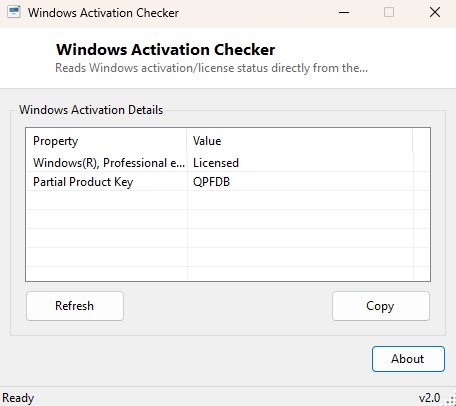
Overview
Windows Activation Checker reads your copy of Windows' real licensing state directly from the same internal service the Settings app itself queries, and presents it without the extra clicks. Instead of navigating to Settings → System → Activation and waiting for that page to load, this tool opens straight to the answer: is Windows activated, and if not, exactly which grace or notification state is it currently in.
Key Features
- Reports current license status in plain language, not a raw status code
- Distinguishes Licensed, Unlicensed, Grace period and Notification states
- Shows the partial product key associated with the active license
- Reads directly from the Software Licensing Service, the same source Settings uses
- Opens instantly with no waiting on a Settings page to render
- Completely read-only — makes no activation changes
Why You Might Need This Tool
After a major hardware change, a motherboard replacement, or a clean Windows reinstall, confirming activation carried over correctly is one of the first things worth checking, and doing it from a lightweight tool is faster than waiting on the full Settings app. IT staff supporting multiple machines also benefit from a quick, scriptable-feeling status check rather than clicking through the same Settings page dozens of times across different PCs.
How It Works
The tool queries WMI's SoftwareLicensingProduct class, filtered to
entries where PartialProductKey is not empty and the product name
starts with "Windows" — this is the same underlying WMI class Microsoft's own
licensing tools and the slmgr.vbs script query. The numeric
LicenseStatus field it returns (0 through 6) is mapped to its plain-
English meaning — Unlicensed, Licensed, Out-of-Box Grace, Out-of-Tolerance Grace,
Non-Genuine Grace, Notification, or Extended Grace — since Windows itself never
surfaces that raw numeric code anywhere in its own UI. The associated partial
product key is displayed alongside it for reference.
How to Use It
Run the tool and read the status line — it shows the license status and partial key immediately with no further interaction needed. If the status is anything other than "Licensed," Settings → System → Activation → Troubleshoot remains the correct next step to actually resolve the issue; this tool's job stops at reporting the current state clearly.
System Requirements & Notes
Runs on Windows 10 and 11 x64 without administrator rights, since licensing status queries are available to standard user accounts through WMI.
Frequently Asked Questions
Can this tool activate Windows for me?
No — it is a read-only status reporter. Activation itself must go through
Settings or the appropriate Microsoft activation channel.
Does it show my full product key?
No, only the partial key Windows itself displays for identification purposes. See
Windows Product Key Viewer for the
backup key decode, with its own caveats about digitally-licensed installs.