Overview
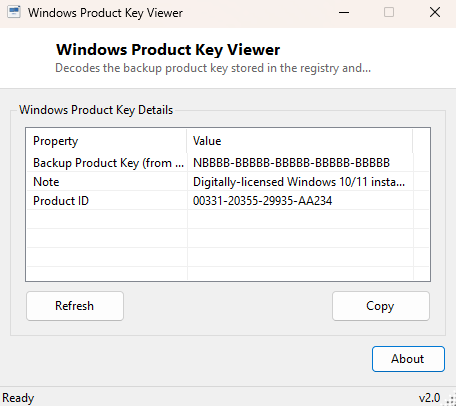
Windows Product Key Viewer decodes the backup product key Windows stores in its own registry into readable XXXXX-XXXXX-XXXXX-XXXXX-XXXXX form. This is the same key-recovery technique that has existed in various community tools for well over a decade, reimplemented here as a clean, self-contained utility with an honest, upfront explanation of the one important limitation every version of this technique shares: modern digitally-licensed Windows installs frequently do not store a meaningful plaintext key at all, because activation is tied to a hardware or Microsoft account fingerprint instead.
Key Features
- Decodes the registry-stored backup product key into standard readable format
- Also displays the associated Product ID for reference
- Clearly explains when a digital license means no meaningful key is stored
- Instant results with no external lookups or network access
- Completely offline and read-only
Why You Might Need This Tool
Before wiping and reinstalling Windows on an older PC that was activated with a traditional retail or OEM key (rather than a digital license), recovering that key from the currently-installed system is often the only remaining record of it — especially for machines purchased years ago where the printed sticker has long since worn away or been removed. It also serves as a quick way to confirm which edition-specific key format is associated with a given installation.
How It Works
Windows stores a binary value named DigitalProductId under
HKEY_LOCAL_MACHINE\\SOFTWARE\\Microsoft\\Windows NT\\CurrentVersion
that encodes the backup product key using a base-24 encoding scheme dating back to
Windows XP/Vista-era activation. The tool reads those raw bytes and reverses the
encoding using the well-documented decode algorithm: repeatedly dividing a 15-byte
segment of the key data by 24 and mapping each remainder to a character from the
fixed alphabet BCDFGHJKMPQRTVWXY2346789, detecting the Windows
8-and-later key format (which inserts an extra "N" character) by checking a
specific bit in the data. The result is grouped into the familiar five-character
dash-separated blocks.
How to Use It
Run the tool and the decoded key appears immediately alongside the Product ID. If the decoded value looks generic or placeholder-like rather than a real key, that is expected behavior on a digitally-licensed Windows 10/11 install — the tool displays a note explaining this rather than presenting a misleading result as if it were a genuine recoverable key.
System Requirements & Notes
Runs on Windows 10 and 11 x64 without administrator rights, since reading this particular registry value does not require elevation. This tool only ever reads from the local machine's own registry; it makes no network requests and does not verify or activate anything.
Frequently Asked Questions
Why does the key it shows not work when I try to use it?
On digitally-licensed Windows 10/11 installs, the stored value is often a generic
placeholder rather than a functional retail key, because activation does not rely
on that value at all in a digital-license scenario.
Is this the same as my full 25-character retail key?
Yes, when a genuine key is present, this decodes the complete key in the standard
5x5 format — unlike Windows Activation Checker's partial key display, which
intentionally shows only a few characters for identification.