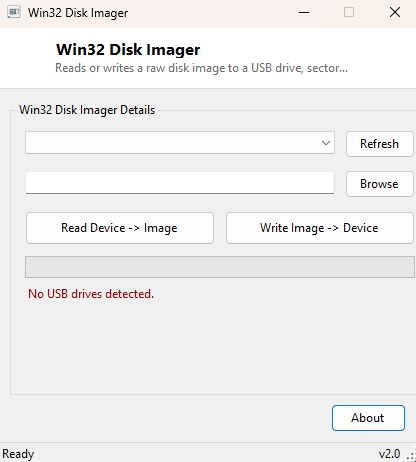
Overview
Win32 Disk Imager reads or writes a raw disk image sector-by-sector to a USB drive — the exact technique behind flashing a bootable Linux installer, writing a Raspberry Pi SD card image, or archiving the full byte-for-byte contents of a small removable disk for backup. This is lower-level work than copying files: an image captures the entire disk, partition table and all, so restoring it produces a drive that boots or behaves identically to the original, not just a folder of the same files.
Because writing directly to a physical disk is inherently destructive to whatever was on it before, this tool is deliberately scoped to removable USB drives only, and every write operation requires an explicit confirmation naming the exact drive before anything happens.
Key Features
- Read mode: captures an entire USB drive to a single .img file, byte for byte
- Write mode: writes a .img file back to a USB drive, sector by sector
- Drive list restricted to USB-interface disks only, identified via WMI
- Live progress bar showing percentage complete during read or write
- Explicit confirmation dialog naming the exact target drive before any write
- 1 MB chunked I/O for a good balance of throughput and UI responsiveness
Why You Might Need This Tool
The most common use case is flashing a bootable image — a Linux live USB, a recovery environment, or firmware for a single-board computer like a Raspberry Pi — where the target device needs an exact sector-level copy of the source image rather than a simple file copy, because the image contains its own partition table and boot sector. The reverse direction matters just as often: capturing a full image of a working USB drive before you experiment with repartitioning it, or archiving the exact state of a small embedded device's storage for later restoration. Because both directions operate at the raw sector level, either one recreates the disk exactly as it was, including anything a plain file copy would silently miss.
How It Works
Both directions of Win32 Disk Imager use direct Win32 file APIs rather than the .NET
System.IO file classes, because reading or writing a physical disk device
(as opposed to a file on a filesystem) requires opening it as a raw device handle. The
tool calls CreateFile on a path like \\.\PhysicalDriveN with
GENERIC_READ or GENERIC_WRITE access, then reads or writes in
1 MB chunks using ReadFile and WriteFile directly against that
handle — the same low-level mechanism the real Win32 Disk Imager and similar flashing
tools use. The drive list itself is built from a WMI query against
Win32_DiskDrive filtered to InterfaceType='USB', so internal
system drives never appear as selectable targets in the first place — an intentional
safety boundary baked into the tool rather than left to user judgment alone.
How to Use It
To read a drive to an image: select the USB drive from the list, choose or type a save path for the .img file, and click "Read Device → Image." To write an image to a drive: select the target drive, browse to an existing .img file, and click "Write Image → Device" — a confirmation dialog names the exact drive and warns that all its data will be erased before the write proceeds. The progress bar tracks completion percentage for either operation.
System Requirements & Notes
Opening a physical drive handle for raw read or write access requires Administrator rights; Win32 Disk Imager will report a failure to open the device if not run elevated. Only USB-interface drives are ever listed as targets — there is no way to select an internal system or data drive through this tool's interface, by design.
Frequently Asked Questions
Can I image an internal hard drive with this tool?
No — the drive list is deliberately filtered to USB-interface disks only, specifically
to prevent an accidental write to a system drive.
Why does it need Administrator rights just to read a drive?
Opening any physical disk device with CreateFile for raw sector access —
even read-only — requires elevated privileges under Windows' security model.
Does it verify the write afterward?
Not automatically in this version — for critical images, re-read the written drive
separately and compare file sizes or hashes against the source image.