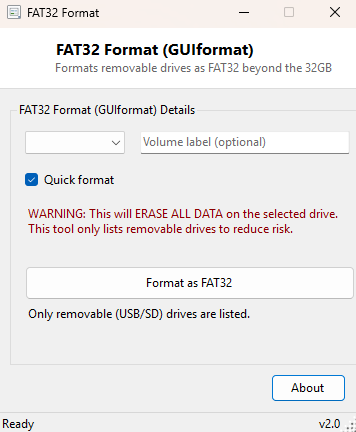
Overview
Windows' own Format dialog has quietly enforced an odd restriction for over two decades: it refuses to format any drive larger than 32GB as FAT32, silently limiting you to exFAT or NTFS instead. That restriction made sense in an earlier era of small flash drives, but today it is a genuine problem, because many devices — older car stereos, game consoles, embedded systems, and various single-board computers — only understand FAT32 and cannot read exFAT or NTFS at all. FAT32 Format (GUIformat) exists specifically to remove that artificial GUI limitation, letting you format large removable drives and cards as FAT32 the same way the Windows command line has quietly been capable of doing all along.
Key Features
- Formats removable drives as FAT32 well beyond the 32GB limit Windows' own dialog enforces
- Optional quick format for fast turnaround on drives that do not need a full format
- Custom volume label support
- Only lists removable drives, reducing the chance of formatting the wrong disk
- Explicit, clearly worded confirmation dialog before any data is erased
- Launches the actual format operation elevated, exactly as Windows requires
Why You Might Need This Tool
The clearest case is a device that flatly will not recognize a drive formatted any other way — many car head units, older digital cameras, retro game consoles and industrial or embedded hardware only support FAT32 and will show the drive as unreadable or unformatted if you hand them exFAT or NTFS instead, regardless of how much capacity the drive actually has. It also matters for cross-compatibility with older operating systems and firmware that predate exFAT support entirely. Rather than hunting down a separate standalone formatting utility just for this one restriction, this tool gives you the same familiar format options Windows already offers, minus the 32GB ceiling.
How It Works
Rather than reimplementing FAT32's on-disk structures from scratch — a genuinely risky
undertaking for a small utility — this tool builds and launches the correct
command-line invocation of Windows' own built-in format command, which
has actually supported FAT32 above 32GB for years even though the graphical Format
dialog never exposed that capability. Based on your chosen drive, file system, quick
format setting and volume label, the tool constructs a command like format X:
/FS:FAT32 /Q /V:LABEL /Y and launches it through cmd.exe with an
elevation request, since formatting a volume is an administrative operation Windows
will not permit otherwise. The drive list itself is filtered to only show removable
media (DriveType.Removable) specifically so a fixed internal drive never
appears as a selectable target by mistake.
How to Use It
Select the target removable drive from the dropdown, choose FAT32 as the file system, optionally set a volume label, and tick Quick Format if you do not need a full surface scan. Click Format as FAT32 and confirm the warning dialog, which states plainly that all data on the drive will be erased; Windows will then prompt for elevation before the format actually begins.
System Requirements & Notes
This tool runs on 64-bit Windows 10/11 and requires administrator rights, since formatting any volume is an elevated operation in Windows regardless of what tool initiates it. Formatting is irreversible — every file on the selected drive will be permanently erased, which is exactly why this tool restricts its drive list to removable media only and requires an explicit confirmation before proceeding.
Frequently Asked Questions
Why can't I format my internal system drive with this tool?
By design — the drive list only shows removable media specifically to prevent an
accidental format of a fixed internal drive.
Is there an actual technical limit to how large a FAT32 volume can be?
FAT32 itself supports far larger volumes than 32GB; the 32GB ceiling was always a
Microsoft GUI-level policy choice rather than a hard filesystem limitation, which is
exactly what this tool works around.
Should I use FAT32 or exFAT for a modern large USB drive?
If every device you need to use the drive with fully supports exFAT, prefer exFAT for
its lack of a 4GB single-file size limit; choose FAT32 specifically when compatibility
with an older or embedded device that lacks exFAT support is the deciding factor.