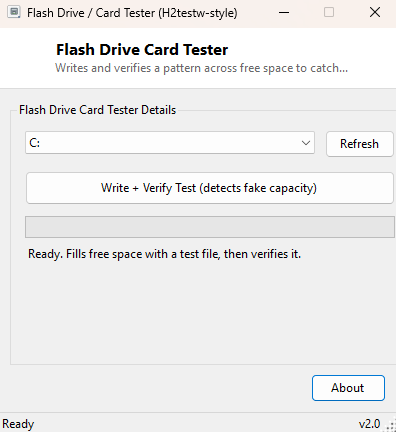
Overview
Flash Drive / Card Tester writes a verifiable data pattern across the free space of a USB drive or SD card, then reads every block back and compares it byte-for-byte against what should be there — the classic H2testw technique for catching "fake capacity" flash storage. Counterfeit flash drives are a genuine, common problem: a device sold and reported by Windows as 512GB might contain only 8GB or 16GB of real flash, with controller firmware that lies about its size and silently wraps around, overwriting earlier data once you pass the real physical capacity. Ordinary use often does not reveal this immediately — copying a handful of small files can succeed even on a fake drive — but a full-capacity write-and-verify pass exposes it reliably, because the corruption shows up the moment total written data exceeds the drive's true size.
Key Features
- Writes a seeded, reproducible random pattern across free space, up to a safety-capped size
- Reads every written block back and compares it against the expected pattern
- Reports the exact block where the first mismatch occurs, if any
- Automatically cleans up its test file when finished, pass or fail
- Works on any writable removable or fixed drive Windows can see
- Live progress bar during both the write and verify passes
Why You Might Need This Tool
The obvious use case is verifying a newly purchased or suspiciously cheap USB drive or SD card before you trust it with anything important — running a full pass immediately after purchase is the single most reliable way to confirm the advertised capacity is real before you rely on that drive for backups or transferring files you cannot afford to silently lose. It is equally useful for drives you already own but have started to distrust after a strange data-loss incident, since genuine capacity fraud is far more common in the used and third-party marketplace flash drive world than most people expect. A clean pass across the drive's full reported free space is strong evidence the capacity is genuine; a mismatch at a specific block, especially one that recurs at a suspiciously round number, is a strong signal the drive is lying about its size.
How It Works
The tool calculates available free space on the selected drive and caps the actual test
size at 2GB or (free space minus 50MB), whichever is smaller — large enough to catch
most common counterfeit capacities without an excessively long test on genuinely large
drives. It writes the test data in 1MB blocks; for each block index, it seeds a
Random instance with that block's own index number
(New Random(blockIndex)) and fills the block with the resulting
pseudo-random bytes before writing it to a temporary file on the drive. Critically, the
verify pass regenerates the exact same expected bytes for each block by re-seeding
Random with the same block index, rather than keeping the original data in
memory — meaning the comparison is a genuine independent re-derivation of what each block
should contain, not just a check against a cached copy. If every block's actual bytes
match the freshly-regenerated expected bytes via
SequenceEqual, the drive passes; the first block where they diverge is
reported as the failure point.
How to Use It
Select the drive to test from the dropdown and click "Write + Verify Test." The tool calculates a safe test size, writes the pattern with a live progress bar, then immediately verifies it with a second progress bar. A clean pass reports the total megabytes verified with no errors; a failure reports the approximate block (and therefore approximate megabyte offset) where the mismatch first occurred. The temporary test file is deleted automatically when the test finishes, whether it passes or fails.
System Requirements & Notes
No administrator rights are required — the test operates through a normal file on the target drive's filesystem, not raw sector access. The test writes real data to the drive's free space during the run; make sure nothing else needs that free space while the test is in progress, and do not remove the drive until the tool confirms completion.
Frequently Asked Questions
Why is the test capped at 2GB even on a large drive?
Most counterfeit capacity claims are caught well within the first couple of gigabytes,
and capping the test keeps runtime reasonable on genuinely large legitimate drives.
My drive failed — is it definitely fake?
A consistent, reproducible failure at the same block on a repeat run is strong evidence
of either fake capacity or a failing flash chip; a one-off failure could also indicate a
loose USB connection worth re-testing before concluding the drive itself is bad.
Does this tool erase my existing files?
No — it only uses currently free space and deletes its own test file afterward; files
already on the drive are never touched.