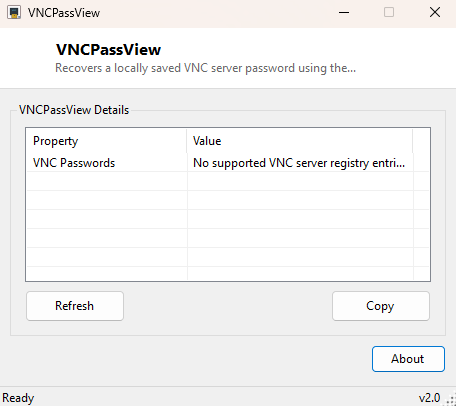
Overview
VNCPassView recovers a VNC server password that has already been saved on the machine you are running it on. VNC servers such as the classic WinVNC/TightVNC family do not store their password in plain text, but they also do not use real encryption — they obfuscate it with a fixed, publicly documented DES key that has been part of the RFB protocol specification for decades. VNCPassView reverses that exact obfuscation and shows you the password stored under your own VNC server configuration, which is invaluable the day you forget a password you set up months or years ago and no longer have written down anywhere.
This is a local recovery tool, not a remote attack tool: it can only read the obfuscated password bytes sitting in the registry of the machine you run it on. It cannot reach into a remote VNC server over the network, and it cannot reverse a password it does not already have local file or registry access to.
Key Features
- Automatically checks the common WinVNC3, RealVNC 4 and TightVNC Server registry locations
- Decodes the obfuscated 8-byte password field using the standard VNC fixed-key DES cipher
- Displays results in a simple two-column property/value list
- One-click Copy button to copy every recovered value to the clipboard
- Read-only — never modifies any registry key it inspects
- No network access, no telemetry, works entirely offline
Why You Might Need This Tool
VNC servers are frequently set up once, on a machine that then runs unattended for years — a home media server, a lab PC, an old workstation kept around purely for remote access. The password gets typed once during setup and then never looked at again, until the day you need to connect from a new device and realize you never actually wrote it down. Reinstalling the VNC server and setting a brand-new password is always an option, but it means reconfiguring every client that already trusts the old one. VNCPassView solves the more common, less disruptive case: the password already exists on disk in obfuscated form, and you just need it decoded back to something you can type into a client.
How It Works
The VNC/RFB protocol's password obfuscation, sometimes loosely called "encryption" in
older documentation, is DES in ECB mode using one specific, fixed 8-byte key —
{23, 82, 107, 6, 35, 78, 88, 7} — that is public and identical across
every compliant VNC implementation. Before use, each byte of that key has its bits
reversed (VNC's password scheme applies bit-reversal per byte as an extra scrambling
step baked into the original RFB spec). VNCPassView reads the 8-byte
Password binary value from each known registry location
(HKCU\Software\ORL\WinVNC3, HKLM\SOFTWARE\ORL\WinVNC3\Default,
HKLM\SOFTWARE\RealVNC\WinVNC4, HKLM\SOFTWARE\TightVNC\Server),
builds a .NET DES decryptor with the bit-reversed key and ECB mode with
no padding, and runs the single 8-byte block through it. The decrypted bytes are then
read as ASCII up to the first null terminator, giving back the original plaintext
password exactly as it was typed during setup.
How to Use It
Launch VNCPassView and it scans the known registry locations automatically — there is nothing to configure. Any password it successfully decodes appears immediately in the results list labeled with which VNC server variant it came from. Click Refresh to re-scan after installing or reconfiguring a VNC server, or Copy to grab every recovered entry onto the clipboard at once.
System Requirements & Notes
Runs on 64-bit Windows 10/11 and does not require administrator rights when reading
the current user's own HKCU registry hive; reading the machine-wide
HKLM locations (used by WinVNC3's Default/service configuration,
RealVNC 4 and TightVNC Server) may require an elevated prompt depending on how that
particular VNC server was installed and permissioned.
Frequently Asked Questions
Can this recover a password from a remote computer?
No. It only reads registry values that are already present locally on the machine
you run it on — there is no network component at all.
Does this work for every VNC server?
It covers the registry layout used by WinVNC3, RealVNC 4 and TightVNC Server. Some
newer VNC implementations use stronger, non-reversible authentication and will not
have a decodable password stored this way.
Is this the same technique used by well-known NirSoft-style tools?
Yes — the fixed-key DES obfuscation is part of the public RFB specification, so any
tool decoding a locally-stored VNC password uses this identical, well-documented
method.