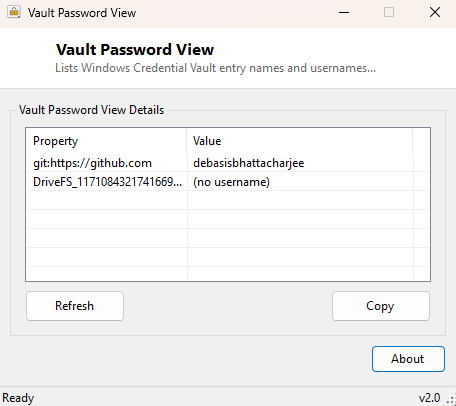
Overview
Vault Password View is an inventory tool for the Windows Credential Vault — it lists the target/resource name and username of every saved credential entry, so you can see at a glance what Windows has stored credentials for. It is deliberately, explicitly an inventory tool and nothing more: it never reads, decrypts or displays the actual saved secret, only the entry's identity.
Key Features
- Lists every Windows Credential Vault entry's target name and username
- Never reads, decrypts, or displays the actual stored password or secret
- Uses the same official Windows Credential Manager API the Control Panel applet relies on
- Simple property/value table, sortable and copyable
- Instant snapshot with a one-click refresh
Why You Might Need This Tool
Windows silently accumulates saved credentials for network shares, mapped drives, remote desktop connections and various applications over months or years, and there is no built-in quick way to see the full list without opening Control Panel's Credential Manager and clicking into each category separately. Vault Password View exists purely for that visibility — auditing what credentials a shared or public-facing machine has accumulated, confirming an old credential for a decommissioned server is still lingering before a security review, or simply understanding what's actually stored before deciding what to clean up manually through the real Credential Manager applet.
How It Works
The tool calls the Windows CredEnumerate API from advapi32.dll via
P/Invoke, the same official function Windows' own Credential Manager Control Panel applet
uses internally to list saved credentials. Each returned CREDENTIAL structure
contains several fields, including TargetName, UserName, and —
critically — a CredentialBlob pointer that, for many credential types, actually
does contain the real decrypted secret if you choose to read it. This tool deliberately
never touches that field: it reads and displays only TargetName and
UserName from each entry via Marshal.PtrToStringUni, then calls
CredFree to release the enumeration buffer without ever marshaling the blob
pointer into memory at all. This is a specific, deliberate safety decision — a tool that
does read and decode that blob would behave identically to real credential-stealing
malware, and Windows Defender itself flags software matching that exact pattern; Vault
Password View was built from the start to stay entirely on the safe, inventory-only side
of that line.
How to Use It
Launch the tool; the full list of saved credential target names and usernames populates automatically. Click Refresh after adding or removing a credential through Windows' own Credential Manager to see the updated list reflected here.
System Requirements & Notes
No administrator rights are required — enumerating your own account's credential vault is a standard-user operation. This tool only ever shows credentials belonging to the currently signed-in user's own vault, never another account's.
Frequently Asked Questions
Can this show me the actual saved password?
No, and it never will by design — this tool intentionally lists only the credential's name
and username, not its secret, to avoid behaving like credential-stealing software.
How do I actually remove a saved credential I see listed here?
Use Windows' own Credential Manager (search "Credential Manager" in Start) to remove
individual entries — Vault Password View is read-only and does not modify the vault.