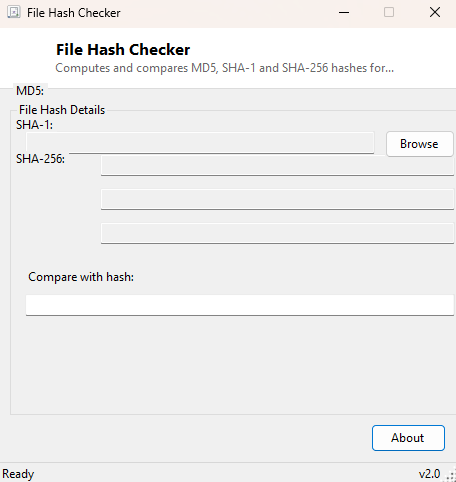
Overview
Whenever a file is downloaded from anywhere other than a source you completely trust, there is exactly one reliable way to confirm it arrived intact and unmodified: comparing its cryptographic hash against the value the publisher posted. A hash function turns a file's entire contents into a short, fixed-length fingerprint — change even a single byte anywhere in a multi-gigabyte file, and the resulting hash comes out completely different. File Hash Checker computes the three most commonly published hash algorithms for any file you select and gives you a place to paste a hash from the download page so it can tell you, immediately and unambiguously, whether they match.
Key Features
- Computes MD5, SHA-1 and SHA-256 simultaneously for any selected file
- Paste a published hash into the compare box for an instant match/no-match verdict
- Comparison is automatically case-insensitive, matching how hashes are usually published
- Works against any of the three algorithms — you don't need to know in advance which one was posted
- Clean, copyable hex output for each algorithm if you need to record it elsewhere
- No file size limit beyond available disk read speed
Why You Might Need This Tool
Software publishers, Linux distribution maintainers and open-source projects routinely publish a SHA-256 or SHA-1 checksum alongside a download specifically so users can confirm the file was not corrupted in transit and, more importantly, was not tampered with somewhere along the way — a compromised mirror or a man-in-the-middle download substitution is a real, documented attack vector for exactly the kind of large ISO or installer files these hashes usually accompany. Beyond security, hashes are also the standard way to confirm two files are byte-for-byte identical without a manual comparison — useful when you have duplicate copies of a file scattered across different folders or drives and need to know for certain whether they are truly the same file or merely similarly named.
How It Works
Once a file is selected, the tool opens it as a stream and passes that stream
through three separate calls to the .NET cryptography library's static hash
methods — MD5.HashData, SHA1.HashData and
SHA256.HashData — reading the file fresh from disk for each algorithm
by resetting the stream position between calls. Each returned byte array is
converted to a lowercase hexadecimal string with Convert.ToHexString
for display. When you paste a value into the compare box, the tool checks it
case-insensitively against all three computed hashes at once using
String.Equals with StringComparison.OrdinalIgnoreCase,
so it does not matter whether the published hash you are checking against is
MD5, SHA-1 or SHA-256 — whichever one matches triggers an immediate green
"MATCH ✓" result, and if none of the three match, a red "NO MATCH ✗" makes the
discrepancy just as obvious.
How to Use It
Click Browse and select the file you want to verify. All three hashes compute and display within moments (larger files simply take proportionally longer to read). Paste the hash value published by the source you downloaded from into the compare field, and watch for the match indicator to confirm or flag the file.
System Requirements & Notes
No administrator rights are required. Hashing is a read-only operation on the selected file, so nothing about the process modifies the file itself in any way. Very large files (many gigabytes) will take longer to hash three times over than a tool that only computes one algorithm, since each pass reads the entire file independently.
Frequently Asked Questions
Which hash algorithm should I trust most?
SHA-256 is the strongest of the three and the current standard for security-
sensitive verification; MD5 and SHA-1 are still widely published for legacy
compatibility and remain perfectly fine for simple integrity checking against
accidental corruption, just not against a deliberately malicious substitution.
Why does the compare box ignore capitalization?
Published hashes are sometimes shown in uppercase and sometimes lowercase
depending on the source; since the underlying value is identical either way, the
comparison intentionally ignores case so a correct match is never missed over
formatting alone.
Can I verify many files against a checksum list at once?
For batch verification against a published .md5/.sha256
manifest file, see HashCheck Shell
Extension, which is built specifically for that workflow.