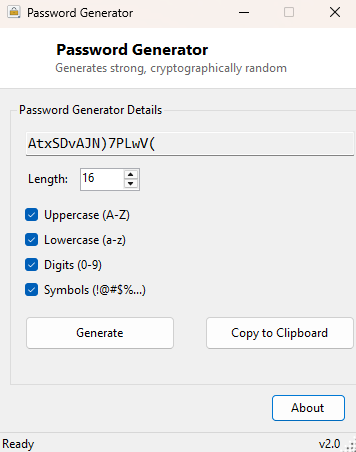
Overview
Password Generator produces long, genuinely random passwords on demand, with configurable length and character sets, so you never have to fall back on a weak hand-typed password or reuse an old one just because you're in a hurry to finish an account signup. It solves one problem and solves it properly: generating unpredictable strings that are hard for an attacker to guess and easy for you to drop straight into a password manager.
Not every "random password generator" is actually random in a way that matters for security. A surprising number of quick scripts and even some shipped utilities lean on a general-purpose pseudo-random number generator that was designed for things like games and simulations, not for producing values an attacker cannot predict. This tool was built specifically to avoid that trap, using a cryptographically secure source of randomness from the very first byte it generates.
Key Features
- Cryptographically secure random generation, not a general-purpose RNG
- Adjustable length from 4 to 128 characters
- Independent toggles for uppercase, lowercase, digits and symbols
- One-click regenerate for a fresh password on demand
- One-click copy to clipboard
- No history, no logging, no saved passwords anywhere on disk
Why You Might Need This Tool
Every new account signup, every service migration, and every "your password has expired, please choose a new one" prompt is an opportunity to either reuse a weak pattern or generate something genuinely strong — this tool exists to make the strong option just as fast as the weak one. It is particularly useful for the class of passwords you set once and store permanently in a password manager rather than memorize: database connection strings, API keys used as passwords, Wi-Fi router admin credentials, and shared service accounts where memorability does not matter at all and maximum entropy does. Matching a specific site's password policy (no symbols, minimum 16 characters, must include a digit) is also easy here, since every character-set toggle and the length field are independent controls rather than a fixed preset.
How It Works
The tool builds its character pool from whichever of the four checkboxes are
ticked — uppercase, lowercase, digits and symbols — then fills a byte array of the
requested length using RandomNumberGenerator from
System.Security.Cryptography, the .NET wrapper around the operating
system's cryptographically secure random number source rather than the
much weaker System.Random class. Each random byte is mapped into the
active character pool using a modulo operation, and the resulting characters are
assembled directly into the final password string with no intermediate storage,
no temp file, and no logging of previous results — regenerating simply discards
the old value and draws a fresh set of random bytes.
How to Use It
Set your desired length with the number field, tick whichever character categories you want included, and a password is generated automatically. Click Generate any time you want a fresh one without changing the settings, and Copy to Clipboard to paste it directly into a signup form or your password manager. If you deselect every character-set checkbox, the tool will tell you plainly that at least one must be selected rather than generating a blank result.
System Requirements & Notes
Runs on 64-bit Windows 10 and Windows 11 and does not require administrator rights. Nothing generated by this tool is written to disk, logged, or transmitted anywhere — each password exists only in the on-screen field and your clipboard until you close the program or copy something else.
Frequently Asked Questions
Why exclude ambiguous characters like 0/O or 1/l by default?
The character pool intentionally uses a curated set of unambiguous letters and
digits to avoid transcription errors if you ever need to type the password by hand
rather than paste it — this trades a small amount of theoretical entropy for
practical usability.
Is a 12-character password from this tool actually strong?
With all four character sets enabled, a 12-character password from a
cryptographically random source has a very large keyspace and is dramatically
stronger than almost any human-chosen password of the same length — length and
randomness both matter, and this tool maximizes the latter.