Overview
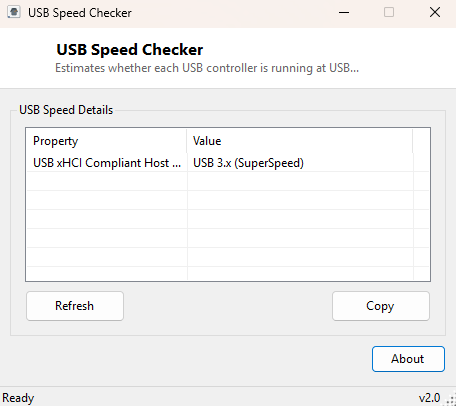
USB Speed Checker gives a quick estimate of whether each USB host controller in your system is operating at USB 2.0 (or earlier) speeds or the significantly faster USB 3.x "SuperSpeed" tier, based on the controller's own driver-reported name and description. It is a lightweight alternative to opening Device Manager and manually interpreting controller names, or to running a full benchmark just to confirm which generation of USB a given port belongs to.
This is a classification tool rather than a live throughput benchmark — it identifies the generation of controller hardware present, not the actual measured transfer speed of a specific connected device, which depends on the device itself, the cable, and what the device supports.
Key Features
- Classifies every detected USB host controller as USB 2.0 or USB 3.x
- Recognizes xHCI (eXtensible Host Controller Interface) naming as a SuperSpeed indicator
- Lists the full driver-reported controller description alongside the classification
- No throughput test required — instant results
- One-click Copy to clipboard
- Zero configuration, single-window interface
Why You Might Need This Tool
USB port speed confusion is common on desktop motherboards and laptops that mix USB 2.0 and USB 3.x ports without clear physical labeling, or on older machines where it's genuinely unclear which controller generation is installed without digging into Device Manager. Before troubleshooting "why is my external drive copying so slowly," it's worth confirming whether the port you plugged into is even capable of SuperSpeed transfer rates in the first place — a USB 3.x drive plugged into a USB 2.0-only port will be bottlenecked to roughly a tenth of its potential speed regardless of how fast the drive itself is.
How It Works
The tool queries Win32_USBController via WMI and reads each controller's
Name and Description fields, then applies a simple text
heuristic: if the description contains "3." or the string "USB3," or references
"xHCI" or "eXtensible" (the host controller interface specification that Intel
introduced specifically for USB 3.0 and later, superseding the older EHCI/UHCI/OHCI
interfaces used for USB 2.0 and 1.1), the controller is classified as USB 3.x
SuperSpeed; otherwise it is classified as USB 2.0 or earlier. This mirrors exactly how
Device Manager itself groups controllers, since Windows' own driver naming convention
for xHCI controllers is the most reliable OS-level signal of USB 3.x capability
without querying controller-specific registers directly.
How to Use It
Launch the tool and every detected USB host controller appears with its speed classification. If you need to know which physical ports map to which controller, cross-reference the controller description against Device Manager's USB Controllers section, since exact port-to-controller mapping varies by motherboard and is not something WMI exposes in a standardized way.
System Requirements & Notes
Runs on 64-bit Windows 10 and 11 and requires no administrator rights — USB controller enumeration through WMI is available to any standard user account.
Frequently Asked Questions
Does this tell me the actual transfer speed of my USB drive?
No — it identifies controller generation only. Real-world transfer speed also depends
on the connected device, the cable, and the filesystem, none of which this tool
measures directly.
Can this distinguish USB 3.1, 3.2 and USB4 from plain USB 3.0?
Not precisely — the underlying WMI description text does not reliably differentiate
between USB 3.x sub-generations, so all SuperSpeed-class controllers are grouped
together under the general "USB 3.x" classification.