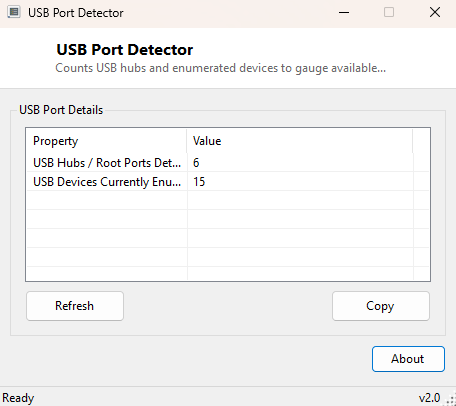
Overview
Counting how many USB ports a PC has sounds like it should be trivial, but the honest answer is that Windows does not present that number directly anywhere in its standard UI — Device Manager will show you controllers, hubs, and connected devices, but never a single tidy "you have N usable USB ports" figure. USB Port Detector approaches the question from the two angles Windows genuinely can answer: how many hub objects (root and external) exist in the system, which roughly bounds the available ports, and how many USB devices are currently enumerated and occupying some of that capacity right now.
This tool is a companion to USB Controller Viewer and USB Power Information, each of which looks at a related but distinct slice of the same underlying USB subsystem — controllers, hubs, and devices are three separate layers, and this tool's job is specifically the hub-and-device-count layer.
Key Features
- Counts USB root hubs and external hubs currently detected by Windows
- Separately counts USB devices currently enumerated on the bus
- One-click Refresh to update both counts after plugging or unplugging hardware
- Copy button exports the summary as plain text
- Runs the scan automatically on launch — no configuration needed
- Purely diagnostic — makes no changes to your USB configuration
Why You Might Need This Tool
This tool earns its keep in "am I actually out of USB ports, or is something else going on" situations — a laptop with a USB-C dock, several peripherals, and a device that mysteriously will not initialize is a classic case where knowing the real hub and device counts helps distinguish a genuine capacity problem from a driver or power issue. It is also a quick sanity check after installing a PCIe USB expansion card: if the hub count did not increase after installation, that is a strong early signal the new controller was not recognized, well before you go digging through Device Manager for a yellow warning triangle.
How It Works
Two independent WMI queries power this tool. The hub count comes from
SELECT DeviceID, Name FROM Win32_USBHub, tallying every hub instance
Windows currently has registered, which includes each USB controller's internal
root hub as well as any external hubs plugged in. The device count comes from a
separate query, SELECT Name FROM Win32_PnPEntity WHERE DeviceID LIKE
'USB%', filtering the full plug-and-play device tree down to entries whose
device instance path begins with the USB enumerator prefix — this catches
everything from flash drives to keyboards to internal USB-connected Bluetooth
radios, giving a genuine picture of how much of the USB subsystem is currently
active. Both counts are independent numbers rather than one derived from the
other, which is intentional: a rising device count against a static hub count is
itself a useful signal that available capacity on existing hubs is filling up.
How to Use It
Launch the program and both counts appear immediately. Plug in or remove a device and click Refresh to see the updated numbers. Use Copy to export the summary as text for a support request.
System Requirements & Notes
Runs on 64-bit Windows 10 and Windows 11 with no administrator rights required — both underlying WMI queries are standard-user reads. Nothing about your system is modified.
Frequently Asked Questions
Does the hub count equal my physical port count?
Not exactly — it is a close proxy, but a single hub chip often drives several
physical ports, so the true port count is usually somewhat higher than the hub
count reported here.
Why did my device count jump after plugging in one flash drive?
Modern flash drives, docks and hubs frequently enumerate as more than one logical
USB device internally (a card reader combo device, for instance, may show as two
or three separate entries), so one physical gadget can add more than one to the count.