Overview
Every long-time Windows user knows the fix, even if they have never had a name for it: a USB device stops responding, unplugging and replugging it fixes the problem, but the port is awkward to reach, the cable is inconvenient, or the device is built-in and cannot physically be unplugged at all. USB Device Reset Tool does the software equivalent of that unplug-replug cycle without touching a single cable — it disables the device driver, pauses briefly, then re-enables it, which forces Windows to reinitialize the device exactly the way a physical reconnect would.
This is not a generic driver-repair tool and does not reinstall anything — it works with whatever driver is already installed and simply forces a clean disable/enable cycle, which is usually all that is needed when a device has landed in a confused or unresponsive state without anything actually being broken.
Key Features
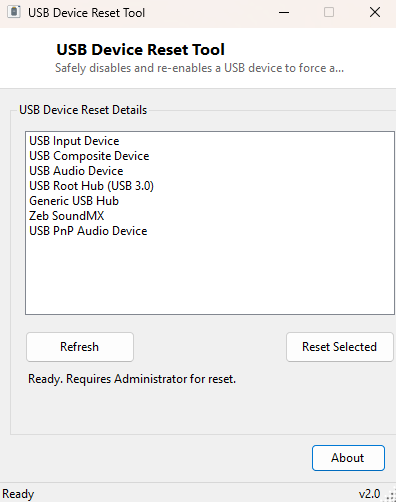
- Lists every currently connected USB device by friendly name
- One-click disable-then-enable reset cycle per selected device
- Automatic 800-millisecond pause between disable and re-enable to let Windows settle
- Refresh button to re-scan the device list after plugging something new in
- Status message confirming whether the reset attempt completed
- No driver reinstallation — works purely by toggling the existing device
Why You Might Need This Tool
USB webcams and audio devices that occasionally "hang" and stop delivering a signal mid-session are the single most common reason to reach for this tool — resetting the device is usually far faster than closing and reopening the application using it, and does not require crawling under a desk to find the actual cable. USB hubs and docking stations that silently drop a connected peripheral after a laptop wakes from sleep are another frequent case, along with external drives that Windows shows as connected but that have stopped responding to read/write requests. Built-in USB controllers on all-in-one PCs or laptops, where physically unplugging is not an option at all, are exactly the scenario this tool was built to cover.
How It Works
The tool queries Win32_PnPEntity through WMI with a filter for
DeviceID LIKE 'USB%' to build the device list, storing each device's
full Plug and Play device ID alongside its friendly name. When you select a device
and click Reset, it re-queries WMI for that exact device ID and calls its
InvokeMethod("Disable", Nothing) WMI method — the same underlying
mechanism Device Manager uses when you right-click a device and choose Disable.
After an 800-millisecond pause (giving Windows time to fully tear down the
device's driver state), it calls InvokeMethod("Enable", Nothing) to
bring it back, which triggers the same plug-and-play re-initialization sequence a
physical reconnect would trigger. Because this uses the standard PnP disable/enable
WMI methods rather than any lower-level or undocumented API, it behaves
predictably and reversibly — if the reset does not fix the problem, the device ends
up back in exactly the state a manual Device Manager toggle would have left it in.
How to Use It
Launch the tool; the device list populates automatically. Click Refresh if you plugged something in after opening the window. Select the misbehaving device from the list and click Reset — the status line confirms the attempt, and the device should briefly disappear and reappear in Windows exactly as it would during a physical unplug/replug.
System Requirements & Notes
Runs on 64-bit Windows 10 and Windows 11. Disabling and enabling a device through WMI generally requires administrator rights, the same as doing it manually through Device Manager — if the reset silently fails, try running the tool as Administrator. Resetting a device that is actively in use by another application (for example a webcam mid-video-call) will interrupt that application's connection to it, exactly as unplugging the device physically would.
Frequently Asked Questions
Will this fix a device with an actually corrupted driver?
Sometimes, but not always — a disable/enable cycle clears a confused runtime state,
but if the driver files themselves are damaged or the wrong version, a full driver
reinstall through Device Manager is the more thorough fix.
Can I reset a USB storage drive that is currently in use?
You can, but Windows will treat it the same as an unsafe removal if files are open
on it — close any open files or applications using the drive first, the same
precaution you would take before physically unplugging it.
Does this reset the whole USB controller, or just one device?
Just the single selected device — other devices on the same port or hub are
unaffected.