Overview
ThermaSense is a real-time, per-core CPU monitor that reads temperature, power draw and clock speed directly from your processor's own hardware sensors rather than board-level ACPI approximations. Where a tool like CPU Temperature Monitor reads the thermal zone Windows itself uses, ThermaSense goes a layer deeper — querying the digital thermal sensors, per-core power registers and clock counters exposed by the processor package — the same class of data classic per-core temperature utilities have relied on for years.
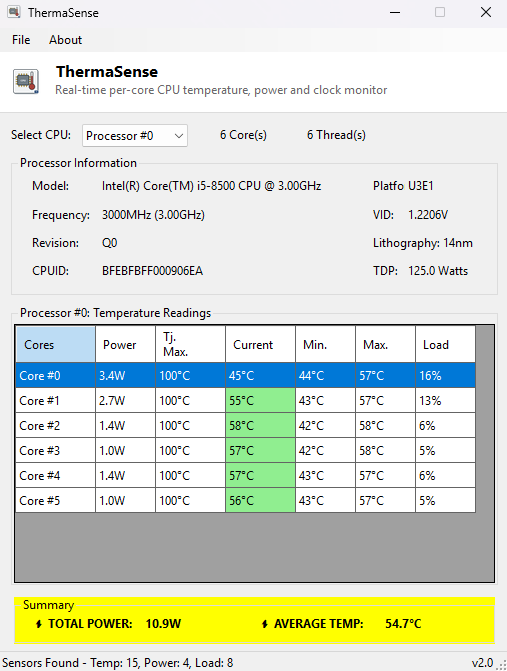
Every core gets its own row: current, minimum and maximum temperature since the last reset, estimated power draw and instantaneous clock, updated once a second, with a color-coded current-temperature column (green through red) so a thermal problem is visible at a glance rather than buried in a column of numbers.
Key Features
- Per-core temperature, power and clock speed, refreshed every second
- Running min/max temperature per core since the last reset
- Color-coded current-temperature column (green / yellow / orange / red)
- Total package power and average-temperature summary strip
- Processor identification: model, socket, CPUID, lithography and TDP
- Minimize-to-taskbar Show/Hide control for leaving it running unobtrusively
Why You Might Need This Tool
Per-core detail matters whenever a problem isn't uniform across the chip — one core running hot while the rest stay cool usually points at thermal paste or cooler contact on that specific die area, something a single whole-package reading can hide entirely. It's also the natural companion to any stress test or overclock attempt: watching individual cores climb in real time tells you exactly when and where a limit is being hit, rather than waiting for the whole system to throttle.
How It Works
ThermaSense uses the open-source LibreHardwareMonitor sensor library to enumerate the
processor's exposed hardware sensors — temperature, power and clock — and matches each
reading back to its originating core by parsing the sensor's reported name and index.
Package-level power is distributed across cores proportionally to their individual load
(read via Windows performance counters) when true per-core power sensors aren't exposed
by the chip. Static identification fields (model, core/thread count, clock speed,
socket) come from the standard Win32_Processor WMI class. Any sensor or
query that fails or isn't exposed by a given system is shown as "N/A" rather than a
guessed or fabricated value.
How to Use It
Launch ThermaSense and approve the administrator elevation prompt when Windows shows it — this is required because reading hardware sensor registers is a privileged operation, the same requirement classic per-core temperature tools have always had. The grid then updates automatically once a second; use File → Refresh to reset the running min/max columns, and File → Show/Hide to tuck the window away while it keeps monitoring in the background.
System Requirements & Notes
Runs on 64-bit Windows 10 and Windows 11. Administrator rights are required every time the program starts, since hardware sensor access is a privileged operation — this is enforced automatically via a UAC prompt on launch. Sensor availability (in particular per-core power) varies by CPU vendor and generation; where a sensor genuinely isn't exposed by the hardware, ThermaSense reports that plainly instead of estimating a number and presenting it as measured fact.
Frequently Asked Questions
Why does it need administrator rights when other monitoring tools on this site
don't?
Reading the CPU's internal sensor registers (rather than the board-level ACPI thermal
zone) requires elevated privileges on Windows. Tools like CPU Temperature Monitor read a
less privileged interface and so don't need it; ThermaSense trades that convenience for
genuine per-core detail.
The VID/voltage value only updates every few seconds — is that a bug?
No — voltage is deliberately sampled less frequently than temperature and load to keep
the display responsive; every other reading updates once a second.