Overview
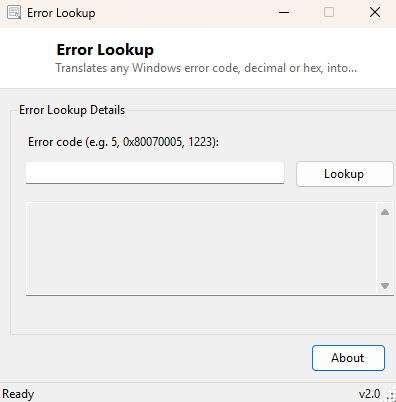
Windows error codes are one of the least user-friendly things the operating system produces — a dialog box that simply says "Error 5" or "0x80070005" and nothing else, leaving you to either recognize the number from memory or go searching online. Error Lookup exists to skip that search entirely: type in any Windows error code, decimal or hexadecimal, and get back the exact plain-English message Windows itself has associated with that code, pulled straight from the operating system's own error message tables rather than a community-maintained list that might be incomplete or out of date.
Key Features
- Accepts error codes in either decimal (5) or hexadecimal (0x80070005) format
- Returns the exact message text Windows itself has for that code
- Pulls definitions directly from the operating system rather than a static bundled list
- Displays both the decimal and hex form of the code alongside the message
- Handles the full range of standard Win32 system error codes
- Instant single-lookup workflow with no lag or external network request
Why You Might Need This Tool
Cryptic numeric error codes show up constantly across Windows — in installer failures, network share connection errors, service startup failures in Event Viewer, and countless application error dialogs that quote a raw Win32 error code without bothering to translate it into something readable. Error 5 is "Access is denied," error 1223 is "The operation was canceled by the user," error 1722 means the RPC server is unavailable — all genuinely useful information once translated, and completely opaque as a bare number. Rather than typing the code into a search engine and wading through forum posts of varying reliability, Error Lookup gives you the authoritative answer directly from Windows in under a second.
How It Works
Windows itself maintains a large internal table of every standard system error code
and its associated message text, accessible through the FormatMessage
Win32 API — the same function every well-written Windows application is supposed to
call internally whenever it needs to show a user-friendly explanation for a system
error rather than a bare number. Error Lookup calls this exact API with the
FORMAT_MESSAGE_FROM_SYSTEM flag, which tells Windows to look the supplied
code up in its own built-in system message table rather than a caller-supplied one.
The tool parses your input to detect whether you typed a decimal number or a
0x-prefixed hexadecimal value, converts it to the raw 32-bit code
FormatMessage expects, and displays whatever message text comes back —
if a code has no associated message in the system table, the tool reports that plainly
rather than showing a blank or misleading result.
How to Use It
Type an error code into the input box — either a plain decimal number like
5 or a hex value like 0x80070005 — and click
Lookup. The result box shows the code in both decimal and hex form
alongside its full message text as reported by Windows.
System Requirements & Notes
Error Lookup runs on 64-bit Windows 10/11 and does not require administrator rights or an internet connection — every lookup is resolved entirely locally through the operating system's own error message tables. Not every numeric code an application might display is a standard Win32 system error; some applications define their own custom error codes with meanings outside Windows' system table, in which case this tool will correctly report that no system message is associated with that number.
Frequently Asked Questions
Does this work for HRESULT codes as well as plain Win32 error codes?
Many common HRESULT values map cleanly onto the same underlying system message table
and will resolve correctly; less common or component-specific HRESULTs may not have an
entry in the system-wide table.
Is there a difference between this and System Error Code Lookup on this site?
They share the same underlying lookup technique — System Error Code Lookup adds a
built-in reference table of the most commonly encountered codes shown automatically on
load, in addition to the same manual lookup box.
Why does my code show no message at all?
That specific numeric value simply is not defined in Windows' own system error message
table — it may be an application-specific or third-party error code rather than a
standard Windows one.