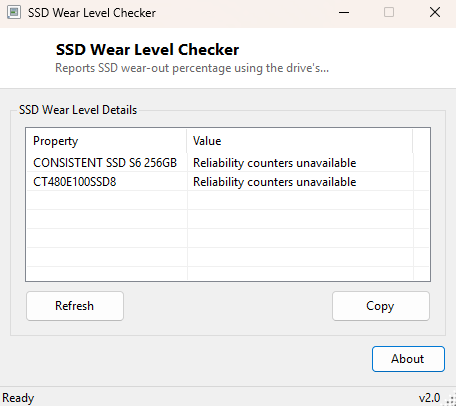
Overview
SSD Wear Level Checker reports exactly how much of a solid-state drive's write endurance has been consumed, expressed as a wear-out percentage sourced directly from the drive controller's own reliability tracking — the same underlying figure vendor tools like Samsung Magician or Crucial Storage Executive display, but read through a universal Windows API that works regardless of which brand of SSD is installed.
Flash memory has a finite number of write cycles per cell, and modern SSD controllers track consumption of that budget internally, exposing it to the operating system as a wear percentage. This tool reads that number directly rather than estimating it from total bytes written, which means the figure reflects the drive's own internal accounting — including wear-leveling algorithms and write amplification the controller applies — rather than a rough approximation.
Key Features
- Reads wear-out percentage directly from each SSD's own controller
- Automatically filters out non-SSD drives, labeling them clearly instead of guessing
- Uses the same reliability-counter mechanism as Windows' own Storage Spaces health reporting
- No vendor-specific software or account required
- One-click Copy to clipboard for record-keeping
- Instant startup, single-window interface
Why You Might Need This Tool
SSDs fail differently from spinning hard drives — rather than gradual mechanical wear with audible warning signs, a flash drive's failure mode is typically silent until it crosses a wear threshold and becomes read-only or drops out entirely. Checking wear periodically, particularly on a drive used for a write-heavy workload like video editing scratch space, a database server, or a system drive that has been in service for several years, gives you advance warning to plan a replacement before data loss becomes a risk rather than after.
How It Works
The tool enumerates physical disks through MSFT_PhysicalDisk in the
root\Microsoft\Windows\Storage WMI namespace, checking each drive's
MediaType property to confirm it is solid-state (media type value 4)
before proceeding — spinning hard drives are labeled "Not an SSD" and skipped rather
than misleadingly showing a wear figure that does not apply to them. For each
confirmed SSD, the tool invokes the GetStorageReliabilityCounter WMI
method, which returns an MSFT_StorageReliabilityCounter object, and
reads its Wear field — a percentage the drive's own firmware calculates
from its internal flash-wear accounting and reports back through the Windows Storage
Management stack, the same modern API layer PowerShell's Get-StorageReliabilityCounter
cmdlet is built on.
How to Use It
Launch the tool and every physical disk appears with either a wear percentage (for SSDs that report one) or a clear "Not an SSD" / "Not reported by this drive" label. Check back periodically — monthly or quarterly is reasonable for most home and office use — rather than expecting the number to change meaningfully between sessions minutes apart.
System Requirements & Notes
Runs on 64-bit Windows 10 and 11. Some systems require Administrator rights to invoke WMI reliability-counter methods successfully; if a drive reports "Reliability counters unavailable," try relaunching the tool elevated.
Frequently Asked Questions
What wear percentage should worry me?
There is no universal cutoff, but many manufacturers consider a drive to be
approaching end-of-life once wear crosses roughly 90-95%; consult your specific SSD's
documentation for its rated endurance.
Why does my SSD show "Not reported by this drive"?
Some older or budget SSD controllers do not populate the Wear field of
the reliability counter even though the drive is correctly identified as solid-state;
this is a controller/firmware limitation rather than an error in the tool.