Overview
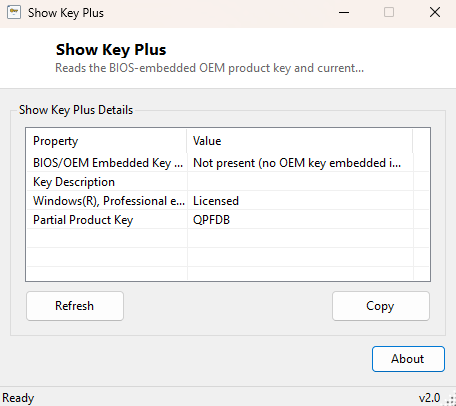
Show Key Plus reads the Windows product key that most modern PCs have permanently embedded in their motherboard firmware, alongside the current activation and licensing status Windows is actually running under. Since Windows 8, PC manufacturers began burning a genuine OEM product key directly into the system's ACPI firmware table (the same OA3.0 mechanism referenced throughout this tool) so that a factory-installed copy of Windows can reactivate itself automatically after a clean reinstall, with no sticker, no manual entry, and nothing to lose. Show Key Plus reads that embedded key back out for you, alongside a readable summary of your current license status.
This is genuinely useful information to have on hand before reinstalling Windows from scratch, transferring a license, or simply confirming that the copy of Windows running on a second-hand PC is legitimately tied to that specific machine.
Key Features
- Reads the BIOS/UEFI-embedded OEM product key (OA3.0), where present
- Shows the manufacturer-supplied description associated with that embedded key
- Reports current Windows license status in plain language
- Shows the partial product key tied to the active license
- Works entirely offline — no license server contacted
- One click, no configuration required
Why You Might Need This Tool
The most common reason to reach for this tool is preparing for a clean Windows reinstall — knowing in advance that a genuine key is embedded in firmware removes the anxiety of "will this PC still activate after I wipe it," since modern Windows setup automatically detects and applies that embedded key during installation. It is equally useful when buying or selling a used PC, letting either side confirm the Windows license genuinely belongs to that specific hardware rather than being a generic or unlicensed installation. IT technicians managing a batch of machines also use tools like this to document license information without needing to peel off (or hunt for a long-gone) Certificate of Authenticity sticker. It also comes in handy after a motherboard replacement or a major hardware change, since it lets you quickly confirm whether the embedded key survived the swap or whether the machine is now relying on Microsoft's digital entitlement tied to the old hardware instead.
How It Works
Show Key Plus queries two related but distinct pieces of Windows Management
Instrumentation. First, it reads the OA3xOriginalProductKey and
OA3xOriginalProductKeyDescription properties from the
SoftwareLicensingService WMI class — this is the exact mechanism
Windows Setup itself uses to check for a firmware-embedded key during a clean
install, and on systems without one it correctly reports that no embedded key was
found rather than fabricating a value. Second, it queries
SoftwareLicensingProduct for entries matching Windows, reading
LicenseStatus (translated from its numeric code into a plain-English
status like Licensed, Notification or Grace Period) and PartialProductKey
— the last five characters of the key actually driving the current activation, which
Windows always exposes even though it withholds the full key for privacy reasons on
digitally-licensed installations.
How to Use It
Launch Show Key Plus and it reads both pieces of information immediately with no setup required. The embedded firmware key (if present) appears at the top, followed by your current license status and partial key. Click Copy to place the full report on the clipboard, useful for pasting into a support ticket or a pre-reinstall notes file.
System Requirements & Notes
Show Key Plus runs on 64-bit Windows 10 and Windows 11 and does not require administrator rights — both WMI classes it queries are readable by a standard user. On digitally-licensed retail or volume-licensed installations, expect the full product key field to be unavailable; Windows deliberately does not store or expose a complete plaintext key for those license types, and Show Key Plus reports that honestly rather than guessing.
Frequently Asked Questions
Why is the embedded key section empty on my PC?
Not every PC has one — the OA3.0 firmware-embedded key mechanism only applies to
machines that shipped with Windows 8 or later pre-installed by an OEM; custom-built
desktops and older upgraded systems typically have no embedded key at all.
Is this the same as my full 25-character product key?
When a firmware-embedded key is present, yes — that field shows the complete key.
The separate "partial product key" field intentionally shows only the last five
characters, matching what Windows itself displays in Settings.
Will this key activate a different PC?
No — OEM firmware-embedded keys are locked to the specific hardware they were issued
for and will not activate Windows on a different machine, even one from the same
manufacturer. Attempting to reuse it elsewhere will simply fail activation, since
Microsoft's licensing servers validate the key against the originating hardware
hash rather than treating it as a generic, transferable code.