Overview
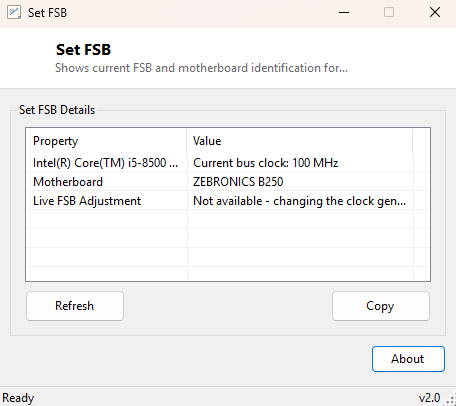
SetFSB reports your processor's current bus clock alongside your motherboard's manufacturer and model identification — the same two pieces of information a real front-side-bus overclocking utility would need before touching anything. The original tool this one is named after worked by directly addressing the motherboard's clock generator chip over the SMBus and changing its frequency output on the fly, live, without a reboot. That technique requires ring-0 hardware I/O access through a kernel driver, and getting the target chip identification wrong, or pushing a frequency the board's voltage regulation cannot support, is a real path to instability or hardware damage. This version deliberately does not attempt it.
Instead, SetFSB gives you the safe, read-only half of that workflow: confirming exactly what bus clock your system reports right now and exactly what motherboard you are working with, information worth having before you go make an actual FSB change through your BIOS/UEFI setup screen by hand.
Key Features
- Reads current processor bus clock (ExtClock) via WMI
- Identifies motherboard manufacturer and product/model
- Zero hardware driver dependency — no SMBus access, no ring-0 code
- Clear explanation of why live FSB adjustment is intentionally out of scope
- Safe to run on any system with no risk of destabilizing the clock generator
Why You Might Need This Tool
SetFSB is useful as a pre-flight check before manually adjusting front-side-bus settings in BIOS/UEFI — confirming your motherboard's exact model (so you can look up its specific FSB overclocking headroom and known-safe ranges in its manual or community forums) and confirming the bus clock value Windows currently reports, which gives you a baseline to compare against after you make a change and reboot. It is also a reasonable quick-identification tool on its own: motherboard model information is not always printed clearly on the board itself, and pulling it via WMI is faster than opening the case to check silkscreen text. For anyone specifically looking for the classic live-adjustment SetFSB tool by name, the honest "not implemented, and here is why" is itself useful information rather than a dead end.
How It Works
SetFSB queries Win32_Processor for Name and
ExtClock — the SMBIOS-reported external/bus clock in MHz — and separately
queries Win32_BaseBoard for Manufacturer and
Product. Both are plain read-only WMI queries requiring no elevated
privileges and no hardware driver. A genuine FSB-adjustment tool would instead need to
identify the specific clock generator chip on the board (there are many
manufacturer-specific variants, each with its own register map), open a direct SMBus
connection to it — typically through a helper kernel driver like WinRing0, itself a
frequent target of antivirus heuristics precisely because of the low-level hardware
access it grants — and write new frequency-multiplier values to specific registers.
That entire pathway is intentionally absent here.
How to Use It
Launch SetFSB and it immediately displays your processor's current bus clock alongside your motherboard's manufacturer and model. There is nothing to configure — it is a pure read-only reference tool. Click Refresh after a BIOS/UEFI setting change and reboot to confirm the new bus clock value.
System Requirements & Notes
No administrator rights are required. This tool makes no changes to your system whatsoever and carries no risk to hardware stability, unlike genuine live clock-generator adjustment tools.
Frequently Asked Questions
Can this tool actually raise my FSB live, without a reboot?
No. That capability requires direct SMBus hardware access via a kernel driver, which
this project does not ship. Live FSB changes must go through your BIOS/UEFI setup.
Why not just include the driver?
Low-level clock generator drivers carry real risk of hardware instability if used with
the wrong parameters, and are frequently flagged by antivirus software due to the
ring-0 access they require — not a trade-off this catalog makes for you automatically.
Is there a similar honestly-scoped tool for clock generator identification?
See ClockGen, its companion tool covering the related base-clock reporting category.