Overview
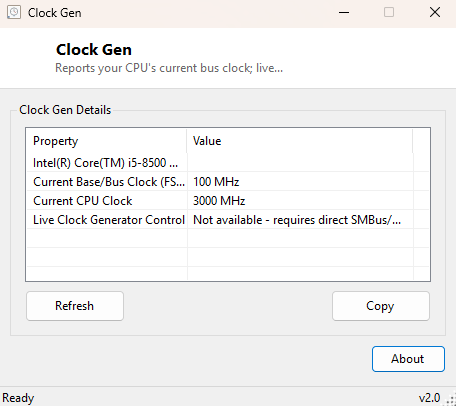
ClockGen reports what Windows' standard hardware APIs can honestly tell you about your processor's bus clock and current running speed. Its name is a nod to the classic motherboard overclocking tools that reprogrammed a system's PLL (phase-locked loop) clock generator chip directly over the SMBus to raise the front-side bus frequency on the fly. This version does not do that. Directly reprogramming a clock generator requires a low-level kernel driver with raw hardware I/O port access, and getting it wrong can destabilize or, in rare cases, damage a system — a risk this catalog does not take on for you without your own hands directly on the BIOS settings. Instead, ClockGen focuses on what it can do safely and reliably: read and clearly present the base clock and current clock speed data Windows already exposes.
Where a genuine hardware clock-generator tool would let you drag a slider and watch your CPU speed change immediately, ClockGen tells you, honestly, that this catalog will not load a driver to do that — and then gives you the best legitimate read-only picture of your CPU's clocking it can.
Key Features
- Reads your CPU's base/bus clock (ExtClock) directly from WMI
- Shows current running clock speed alongside the base clock for comparison
- Clear, explicit statement of what this tool does not attempt, and why
- Zero third-party or kernel-mode driver dependency — pure managed WMI queries
- Safe to run on any system, with no possibility of destabilizing clock changes
Why You Might Need This Tool
ClockGen is most useful as a quick, no-risk reference check — confirming what bus clock your CPU is reporting before you go into BIOS/UEFI setup to make an actual overclocking change by hand, or simply satisfying curiosity about what "base clock" really means on a specific system without digging through spec sheets. It is also a useful sanity check after a BIOS update or CMOS reset, confirming the reported base clock has returned to its expected value. For anyone who remembers the era of software clock generator tools and is looking for that specific name in this catalog, ClockGen's honesty about scope is itself the point — rather than silently doing nothing behind a slider that looks functional, it tells you plainly what data is available and what genuinely is not.
How It Works
ClockGen queries Win32_Processor via WMI for the Name,
ExtClock and CurrentClockSpeed properties. ExtClock
is the processor's external/bus clock in MHz as reported by firmware through SMBIOS —
the same underlying number a real base-clock overclock would multiply against. Not every
system populates this field reliably; some OEM firmware reports 0 or omits it, and
ClockGen displays that honestly rather than guessing a plausible-looking number. Actually
adjusting the clock generator would require direct port I/O to the SMBus at the
hardware-register level, which is only possible through a signed kernel-mode driver with
ring-0 access — a category of software this project deliberately avoids shipping, both
for user safety and because loading such a driver is exactly the kind of behavior
antivirus software (correctly) treats with suspicion.
How to Use It
Launch ClockGen and it immediately displays your processor's name, base/bus clock and current clock speed. There is nothing to configure — it is a pure read-only reference tool. Click Refresh to re-read the values if you have just made a change in BIOS/UEFI setup and rebooted.
System Requirements & Notes
No administrator rights are required — all data comes from standard WMI queries available to any user. This tool makes no changes to your system whatsoever; it is strictly informational.
Frequently Asked Questions
Can I actually overclock my CPU with this tool?
No. ClockGen is read-only by design. Real base-clock overclocking must be done through
your motherboard's BIOS/UEFI setup screen.
Why does my base clock show 0 or blank?
Some OEM motherboard firmware does not populate the ExtClock SMBIOS field
reliably. This is a firmware limitation, not something ClockGen can work around safely.
Is there a companion tool for FSB adjustment?
See SetFSB — it takes the same honest, WMI-only approach to
the related front-side-bus overclocking category.