Overview
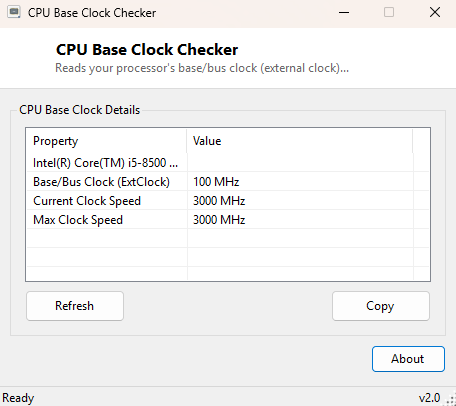
CPU Base Clock Checker reads the processor's external/bus clock — the reference frequency the CPU's internal multiplier is applied to — alongside its current and maximum rated clock speed. This is the same "BCLK" figure overclockers watch closely, since raising it (rather than just the multiplier) scales every clocked component tied to it, which is exactly why dedicated tools like ClockGen and SetFSB exist in this catalog for the small number of systems that still allow that kind of adjustment.
Key Features
- Reports the CPU's external/bus clock (base clock) in MHz
- Shows the current running clock speed alongside it
- Shows the manufacturer-rated maximum clock speed for comparison
- Instant results with no configuration
- Completely read-only
Why You Might Need This Tool
Understanding how a CPU's advertised clock speed is actually built — a base clock multiplied up to the final frequency — matters when researching overclocking headroom, diagnosing unexpected performance behavior, or simply satisfying curiosity about exactly how a given processor is configured versus its rated maximum. It is often used alongside CPU Frequency Monitor to compare the fixed base clock against the live, boost-adjusted running speed.
How It Works
The tool queries WMI's Win32_Processor class for the
ExtClock property, which reports the external/bus clock in MHz when
the system firmware exposes it — not every motherboard populates this field
reliably, in which case the tool reports it as "not reported" rather than showing
a misleading zero. It reads CurrentClockSpeed and
MaxClockSpeed from the same WMI class alongside it, giving a
three-number picture: the reference clock, what the CPU is running at right now,
and its rated ceiling.
How to Use It
Open the tool and all three clock figures appear immediately for your installed processor. There is nothing further to configure.
System Requirements & Notes
Runs on Windows 10 and 11 x64 without administrator rights. This tool is purely informational — it does not adjust any clock setting; for the (limited, hardware- risk-aware) live adjustment tools in this catalog, see ClockGen and SetFSB, both of which explain clearly why they intentionally stop short of direct hardware reprogramming.
Frequently Asked Questions
Why does ExtClock show "not reported" on my system?
A number of modern motherboards, especially laptops and prebuilt desktops, do not
populate this specific WMI field even though the CPU obviously has a base clock —
this is a firmware reporting gap, not an error in the tool.
Can I change the base clock with this tool?
No — it is read-only. Base clock adjustment, where a system supports it at all, is
done through the motherboard's BIOS/UEFI setup screen.