Overview
Pressing Delete in Windows Explorer does not actually erase a file's contents — it removes the file system's reference to it and marks the space as reusable, but the original bytes typically remain on disk, recoverable with ordinary undelete software, until something else happens to overwrite that space. For most everyday deletions that gap between "gone from the folder" and "genuinely unrecoverable" never matters. Secure Delete Tool exists for the moments it does: overwriting a file's actual content with random data before removing it, so that what gets deleted is genuinely gone rather than merely hidden from the file system's index.
This is the faster, single-pass counterpart to File Shredder in this catalog, which offers a configurable multiple-pass option for more sensitive material — Secure Delete Tool trades some of that extra assurance for speed, appropriate for routine sensitive cleanup rather than files you consider genuinely high-stakes.
Key Features
- Overwrites file content with random data before deleting it
- Single-pass operation, noticeably faster than multi-pass shredding
- Add multiple files at once for a batch secure-delete operation
- Explicit confirmation prompt before anything is touched, since the action cannot be undone
- Renames the file to a random name before final deletion, removing the original file name too
- No installation, no background process — runs only when launched
Why You Might Need This Tool
Ordinary deletion is fine for the overwhelming majority of files, but a specific category of document genuinely warrants more care: financial records, personal correspondence, draft contracts, anything containing account numbers or personal data you would not want recoverable if the drive were ever sold, donated, or simply accessed by someone else after you believed it was clean. A single random-data overwrite pass is a reasonable, fast middle ground between doing nothing special (ordinary Explorer delete) and the heavier multi-pass approach File Shredder offers for material you consider especially sensitive — appropriate when you want meaningfully better assurance than a normal delete without committing the extra time a full multi-pass wipe takes on a large file.
How It Works
For each selected file, the tool first records the file's exact length, then opens
it for writing and fills it end-to-end with cryptographically-seeded random bytes
generated in 64KB chunks via Random.NextBytes(), flushing the write
to disk. Once the content has been fully overwritten, the tool renames the file to a
randomly generated GUID-based name — which erases any trace of the original,
potentially meaningful file name from the file system metadata — and only then
calls IO.File.Delete() on that renamed file. This two-step sequence
(overwrite content, then rename, then delete) means that even if some trace of file
system metadata survives after deletion, it points to a random name rather than the
original one, and any tool attempting to recover the underlying data blocks would
find only the random overwrite pattern rather than the original content.
How to Use It
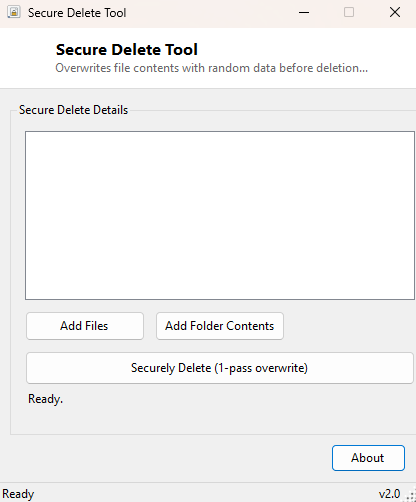
Click Add Files to select one or more files, or Add Folder Contents to queue every file inside a chosen folder (including subfolders) at once. Review the queued list, then click Securely Delete. A confirmation dialog states clearly that the operation is permanent and cannot be undone — read it carefully, since unlike a normal Explorer deletion, files removed this way cannot be recovered from the Recycle Bin or by any standard undelete tool afterward.
System Requirements & Notes
Secure Delete Tool runs on 64-bit Windows 10 and 11 and does not require administrator rights to delete files the current user already has write access to. It cannot be undone — there is no Recycle Bin recovery for anything processed through this tool, which is the entire point, so always double-check the file list before confirming.
Frequently Asked Questions
How is this different from File Shredder?
File Shredder offers a choice of 1, 3 or 7 overwrite passes for stronger assurance
on especially sensitive files; Secure Delete Tool always performs a single fast pass,
trading some of that extra assurance for speed on routine cleanup.
Does this securely wipe free space left over from previously deleted files?
No — it only overwrites files you explicitly select right now. It cannot retroactively
overwrite space freed by earlier ordinary deletions.