Overview
When you delete a file the ordinary way, Windows does not actually erase its contents. It removes the file's entry from the folder's index and marks the disk space it occupied as free — the bytes themselves stay on the drive, physically intact, until something else happens to overwrite that space, which might take days, months, or never. That is exactly why "recover deleted files" tools exist and work as well as they do. File Shredder closes that gap for the specific files you tell it to: instead of a normal delete, it overwrites the file's actual content with random data one or more times, renames it to a meaningless random name, and only then deletes it — so there is no recognizable filename left pointing at recoverable data, and the original bytes have already been replaced.
This is not a tool for everyday cleanup. Emptying your Downloads folder or clearing out old screenshots does not need shredding — a normal delete is fine. File Shredder exists for the smaller, more deliberate category of files you genuinely do not want anyone to be able to recover later: an old tax document, a spreadsheet with account numbers, a draft contract, credentials you jotted down in a text file and meant to delete properly the first time.
Key Features
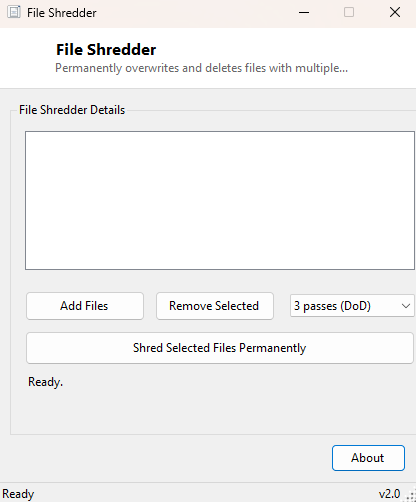
- Add individual files to a shred queue before committing to anything
- Choose between 1-pass (fast), 3-pass (DoD-style) and 7-pass (secure) overwrite depths
- Random-data overwrite fills the entire file length before deletion
- File is renamed to a random GUID-based name before the final delete
- Explicit confirmation dialog before anything irreversible happens
- Queue updates live as each file finishes, so partial batches are easy to track
Why You Might Need This Tool
The most common trigger for reaching for a shredder is preparing to give up a computer, hard drive, or USB stick — selling it, donating it, returning a work laptop, or handing a drive off for repair. A normal "empty the recycle bin" pass leaves every file trivially recoverable with free undelete software, which is a real and common way sensitive personal or business data leaks from devices that people genuinely believed they had wiped. File Shredder is also useful on a day-to-day basis for one-off sensitive documents — a saved copy of a bank statement, an exported password list, a screenshot containing a temporary two-factor code — the kind of file that only needs to exist for a few minutes and should not linger as a recoverable artifact afterward.
How It Works
For each file in the queue, the tool opens it directly with a
FileStream in write mode, determines its length, then repeatedly
fills a 64KB buffer with cryptographically-flavored random bytes from
System.Random and writes those bytes across the entire file length —
once for the 1-pass option, three times for the DoD-style option, seven times for
the maximum option, flushing after each pass. Once the overwrite passes are
complete, the file is renamed in place to a new name derived from
Guid.NewGuid(), and only then is IO.File.Delete called
on that randomly-named file. Renaming before deleting matters because a
filesystem's directory entry itself can retain traces of the original filename
even after the file record is removed — shredding both the content and the name
closes that gap. The whole sequence runs on the UI thread with periodic
Application.DoEvents() calls so the window stays responsive and the
status label updates per file.
How to Use It
Click Add Files and select everything you want gone, choose an overwrite depth from the dropdown (3-pass is a reasonable default for most people; 7-pass takes proportionally longer and is aimed at extra caution on mechanical hard drives), then click Shred Selected Files Permanently. A confirmation dialog states plainly that the action cannot be undone — read it before clicking Yes, because this is the one moment in the whole workflow where a mistake cannot be reversed.
System Requirements & Notes
File Shredder runs on 64-bit Windows 10/11 and does not require administrator rights for files you own in your own user folders; shredding a file in a protected system location may prompt for elevation depending on that file's permissions. On modern SSDs, wear-leveling means a logical overwrite is not a perfect physical guarantee the original flash cells were touched — for maximum assurance on an SSD you are retiring entirely, consider whole-drive secure erase instead of file-by-file shredding.
Frequently Asked Questions
How many passes do I actually need?
For virtually all personal use, a single pass of random data is already enough to
defeat ordinary undelete and file-recovery software. The 3-pass and 7-pass options
exist mainly for peace of mind and older forensic-recovery threat models.
Can I shred an entire folder at once?
Add files one at a time or select multiple files in the browse dialog; there is no
recursive whole-folder mode in this version, by design, to keep the confirmation
step meaningful rather than a single click erasing hundreds of files unexpectedly.
Is this the same as Secure Delete Tool?
They are closely related — Secure Delete Tool offers a faster single-pass option
for lower-sensitivity cleanup, while File Shredder is built around configurable
multi-pass depth for files you want to be extra certain about.