Overview
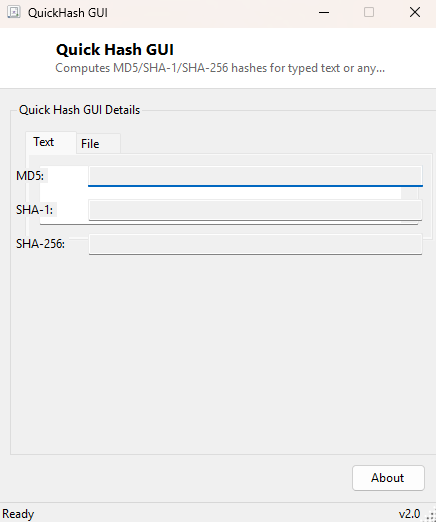
Quick Hash GUI computes MD5, SHA-1 and SHA-256 digests side by side, for either a file you select or plain text you type directly into the window — the two most common hashing scenarios covered in one small tool with a simple tabbed interface, rather than needing a separate utility for each. Typed text hashes update live as you type, which makes it a convenient scratch pad for quickly checking a checksum value against something you already have in hand, like a value copied from an email or a support ticket.
Key Features
- Computes MD5, SHA-1 and SHA-256 simultaneously for a single input
- Separate tabs for hashing typed text versus hashing a selected file
- Text-tab hashes update live as you type, with no separate "calculate" step
- Uses UTF-8 encoding for text input, the standard choice for cross-platform hash comparison
- Simple, minimal interface with no configuration or algorithm selection required
Why You Might Need This Tool
Developers and system administrators reach for a quick hash calculator constantly — confirming a downloaded file's integrity against a published checksum, generating a reference hash for a configuration file before deploying it to multiple machines, or simply checking whether two pieces of text are byte-for-byte identical by comparing their hashes rather than eyeballing potentially very long strings for differences. Having all three common algorithms computed at once, rather than picking one up front, means you never have to re-run the tool because the checksum you were given turned out to use a different algorithm than the one you first tried.
How It Works
For the Text tab, every keystroke triggers a recalculation: the current text is
encoded to a UTF-8 byte array, and .NET's built-in MD5.HashData,
SHA1.HashData and SHA256.HashData static methods each compute
their respective digest directly from that byte array, with the results converted to
lowercase hexadecimal strings for display. For the File tab, choosing a file reads its
entire contents into memory as a byte array and runs the same three hash functions
against that data. All three algorithms are standard, well-audited cryptographic hash
functions built directly into the .NET runtime — no external cryptography library is
involved.
How to Use It
On the Text tab, simply type or paste text into the input box and watch all three hash values update immediately below. On the File tab, click Browse and select any file; its three hashes appear as soon as the file finishes reading, which for very large files may take a moment since the entire file must be read into memory first.
System Requirements & Notes
Runs on 64-bit Windows 10 and Windows 11 with no administrator rights required. Very large files (multiple gigabytes) will consume a proportional amount of memory since the current implementation reads the whole file at once rather than streaming it in chunks.
Frequently Asked Questions
Why does hashing the same text produce a different result than another tool?
This almost always comes down to text encoding — this tool uses UTF-8, which is the
modern standard, but older tools sometimes default to a different encoding, producing
a different byte sequence and therefore a different hash for text containing
non-ASCII characters.
Is MD5 still safe to rely on for security purposes?
No — MD5 and SHA-1 are both considered cryptographically broken for security-sensitive
purposes like digital signatures, though they remain perfectly fine for basic file
integrity and corruption checks, which is the primary use case this tool targets.
SHA-256 is the recommended choice whenever real security guarantees matter.